
Why is Kafka so fast? How does it work?
Why is Kafka so fast? How does it work?

With data streaming into enterprises at an exponential rate, a robust and high-performing messaging system is crucial. Apache Kafka has emerged as a popular choice for its speed and scalability - but what exactly makes it so fast?
In this issue, we'll explore:
Kafka's architecture and its core components like producer, brokers, and consumers
How Kafka optimizes data storage and replication
The optimizations that enable Kafka’s impressive throughput and low latency
Let’s dive into Kafka’s core components first.
Kafka Architecture Distilled
In a typical scenario where Kafka is used as a pub-sub messaging middleware, there are 3 important components: producer, broker, and consumer. The producer is the message sender, and the consumer is the message receiver. The broker is usually deployed in a cluster mode, which handles incoming messages and writes them to the broker partitions, allowing consumers to read from them.
Note that Kafka is positioned as an event streaming platform, so the term “message”, which is often used in message queues, is not used in Kafka. We call it an “event”.
The diagram below puts together a detailed view of Kafka’s architecture and client API structure. We can see that although the producer, consumer, and broker are still key to the architecture, it takes more to build a high-throughput, low-latency Kafka. Let’s go through the components one by one.
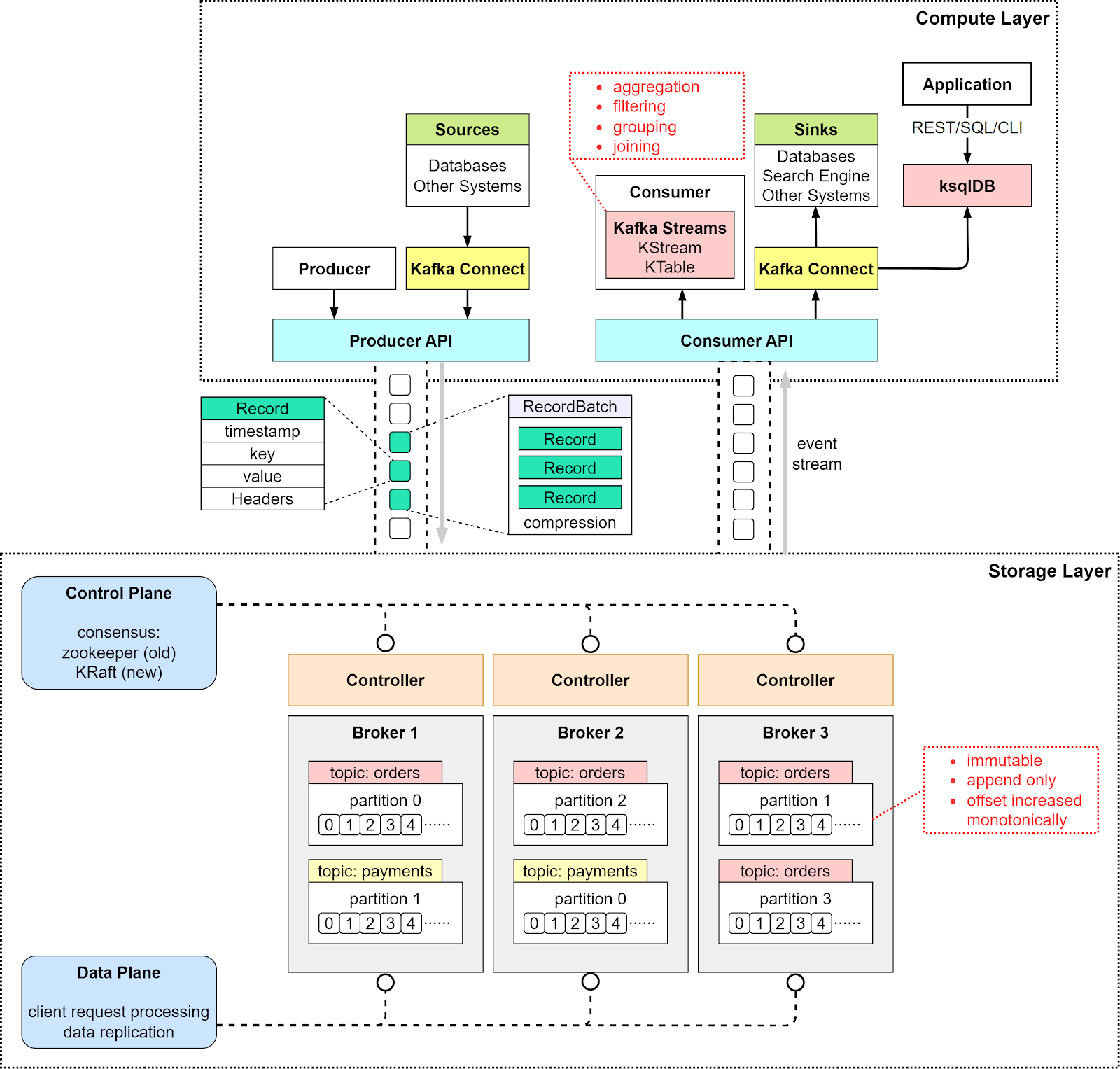
From a high-level point of view, there are two layers in the architecture: the compute layer and the storage layer.
The Compute Layer
The compute layer, or the processing layer, allows various applications to communicate with Kafka brokers via APIs.
The producers use the producer API. If external systems like databases want to talk to Kafka, it also provides Kafka Connect as integration APIs.
The consumers talk to the broker via consumer API. In order to route events to other data sinks, like a search engine or database, we can use Kafka Connect API. Additionally, consumers can perform streaming processing with Kafka Streams API. If we deal with an unbounded stream of records, we can create a KStream. The code snippet below creates a KStream for the topic “orders” with Serdes (Serializers and Deserializers) for key and value. If we just need the latest status from a changelog, we can create a KTable to maintain the status. Kafka Streams allows us to perform aggregation, filtering, grouping, and joining on event streams.
final KStreamBuilder builder = new KStreamBuilder();final KStream<String, OrderEvent> orderEvents = builder.stream(Serdes.String(), orderEventSerde, "orders");While Kafka Streams API works fine for Java applications, sometimes we might want to deploy a pure streaming processing job without embedding it into an application. Then we can use ksqlDB, a database cluster optimized for stream processing. It also provides a REST API for us to query the results.
We can see that with various API support in the compute layer, it is quite flexible to chain the operations we want to perform on event streams. For example, we can subscribe to topic “orders”, aggregate the orders based on products, and send the order counts back to Kafka in the topic “ordersByProduct”, which another analytics application can subscribe to and display.
The Storage Layer
This layer is composed of Kafka brokers. Kafka brokers run on a cluster of servers. The data is stored in partitions within different topics. A topic is like a database table, and the partitions in a topic can be distributed across the cluster nodes. Within a partition, events are strictly ordered by their offsets. An offset represents the position of an event within a partition and increases monotonically. The events persisted on brokers are immutable and append-only, even deletion is modeled as a deletion event. So, producers only handle sequential writes, and consumers only read sequentially.
A Kafka broker’s responsibilities include managing partitions, handling reads and writes, and managing replications of partitions. It is designed to be simple and hence easy to scale. We will review the broker architecture in more detail.
Since Kafka brokers are deployed in a cluster mode, there are two necessary components to manage the nodes: the control plan and the data plane.
Control Plane
The control plane manages the metadata of the Kafka cluster. It used to be Zookeeper that managed the controllers: one broker was picked as the controller. Now Kafka uses a new module called KRaft to implement the control plane. A few brokers are selected to be the controllers.
Why was Zookeeper eliminated from the cluster dependency? With Zookeeper, we need to maintain two separate types of systems: one is Zookeeper, and the other is Kafka. With KRaft, we just need to maintain one type of system, which makes the configuration and deployment much easier than before. Additionally, KRaft is more efficient in propagating metadata to brokers.
We won’t discuss the details of the KRaft consensus here. One thing to remember is the metadata caches in the controllers and brokers are synchronized via a special topic in Kafka.
Data Plane
The data plane handles the data replication. The diagram below shows an example. Partition 0 in the topic “orders” has 3 replicas on the 3 brokers. The partition on Broker 1 is the leader, where the current data offset is at 4; the partitions on Broker 2 and 3 are the followers where the offsets are at 2 and 3.
Step 1 - In order to catch up with the leader, Follower 1 issues a FetchRequest with offset 2, and Follower 2 issues a FetchRequest with offset 3.
Step 2 - The leader then sends the data to the two followers accordingly.
Step 3 - Since followers’ requests implicitly confirm the receipts of previously fetched records, the leader then commits the records before offset 2.

Record
Kafka uses the Record class as an abstraction of an event. The unbounded event stream is composed of many Records.
There are 4 parts in a Record:
Timestamp
Key
Value
Headers (optional)
The key is used for enforcing ordering, colocating the data that has the same key, and data retention. The key and value are byte arrays that can be encoded and decoded using serializers and deserializers (serdes).
Broker
We discussed brokers as the storage layer. The data is organized in topics and stored as partitions on the brokers. Now let’s look at how a broker works in detail.
Step 1: The producer sends a request to the broker, which lands in the broker’s socket receive buffer first.
Steps 2 and 3: One of the network threads picks up the request from the socket receive buffer and puts it into the shared request queue. The thread is bound to the particular producer client.
Step 4: Kafka’s I/O thread pool picks up the request from the request queue.
Steps 5 and 6: The I/O thread validates the CRC of the data and appends it to a commit log. The commit log is organized on disk in segments. There are two parts in each segment: the actual data and the index.
Step 7: The producer requests are stashed into a purgatory structure for replication, so the I/O thread can be freed up to pick up the next request.
Step 8: Once a request is replicated, it is removed from the purgatory. A response is generated and put into the response queue.
Steps 9 and 10: The network thread picks up the response from the response queue and sends it to the corresponding socket send buffer. Note that the network thread is bound to a certain client. Only after the response for a request is sent out, will the network thread take another request from the particular client.
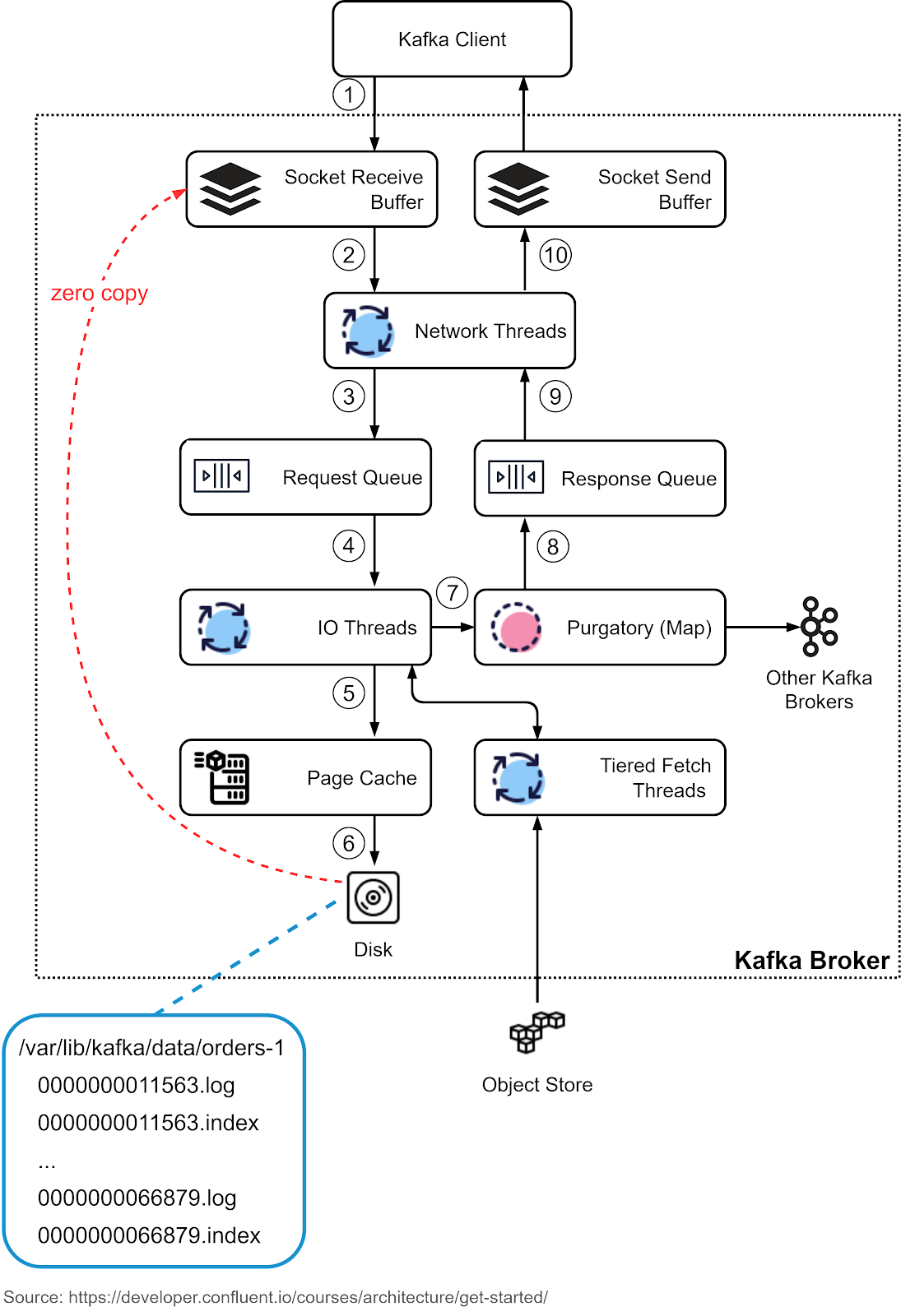
The network thread uses zero-copy transfer to move data directly from the underlying file to the socket buffer. This is one of the reasons why Kafka is fast. We’ll cover the details later.
Consumer Group
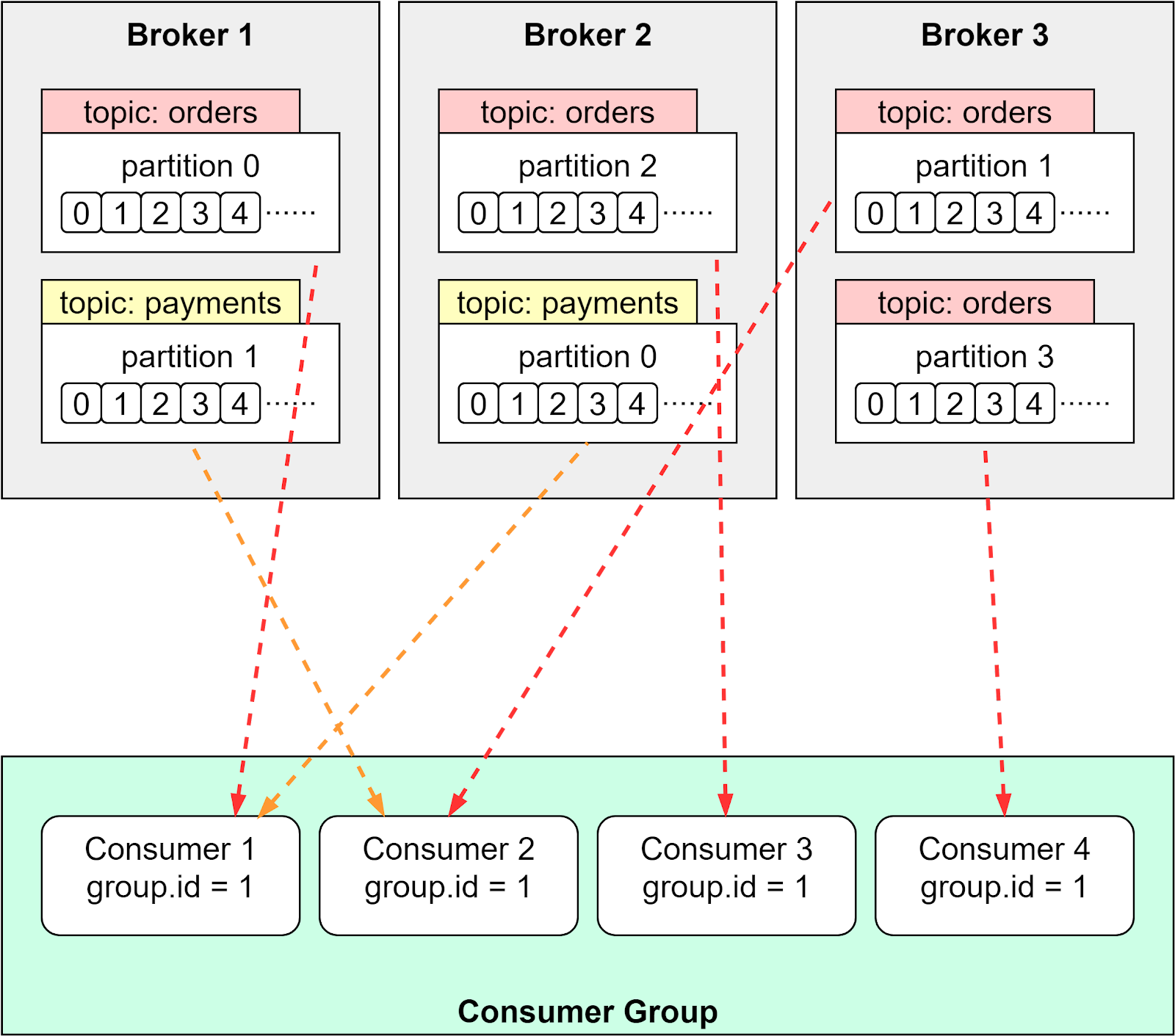
The consumer group is an efficient way to scale the processing of events. We can distribute the load evenly among the consumers so that the events can be processed in parallel. The unit of the distribution is the partition, so a partition is only assigned to one of the consumers in the group. If there is a new consumer joining or leaving the group, the load will be rebalanced.
There are different assignment strategies. For example, range partition strategy distributes a partition at each individual topic level. Topic “orders” has two partitions, which are assigned to Consumer 1 and 2. Topic “payments” has four partitions, which are assigned to Consumer 1, 2, 3 and 4. See the diagram below.
Transaction
When we deal with the database, we use transactions for atomic operations, which means it is “all or nothing”. Kafka transactions guarantee exactly-once semantics and can achieve the same thing. Kafka broker does this by recording the committed offsets. The uncommitted events are not visible to the consumers. Note that enabling transactions brings overhead to the processing, and we need to carefully choose the commit interval of Kafka transactions.
Kafka Optimizations
We have discussed the essential components of Kafka. Now let’s discuss why Kafka can achieve low latency and high throughput.
Compression Serdes
Kafka transfers data in byte arrays, which allows us to choose the serializers and deserializers (serdes) to compress the data. For example, we can use Avro serdes for Kafka Record. This significantly reduces the size of the data to be transmitted.
Batching
Kafka avoids many small I/O operations by building around a “message set” abstraction. This allows the producers and consumers to send and receive events in batches and amortize the overhead of the network round trips. The broker also appends chunks of events in one go instead of appending one event at a time. This simple optimization increases speed by orders of magnitude.
Sequential I/O
We talked about how the Kafka broker uses an append-only event log to guarantee sequential access to the disk. The producers write data sequentially and the consumers read data sequentially. This is much faster than random access, which jumps to many different locations on disk
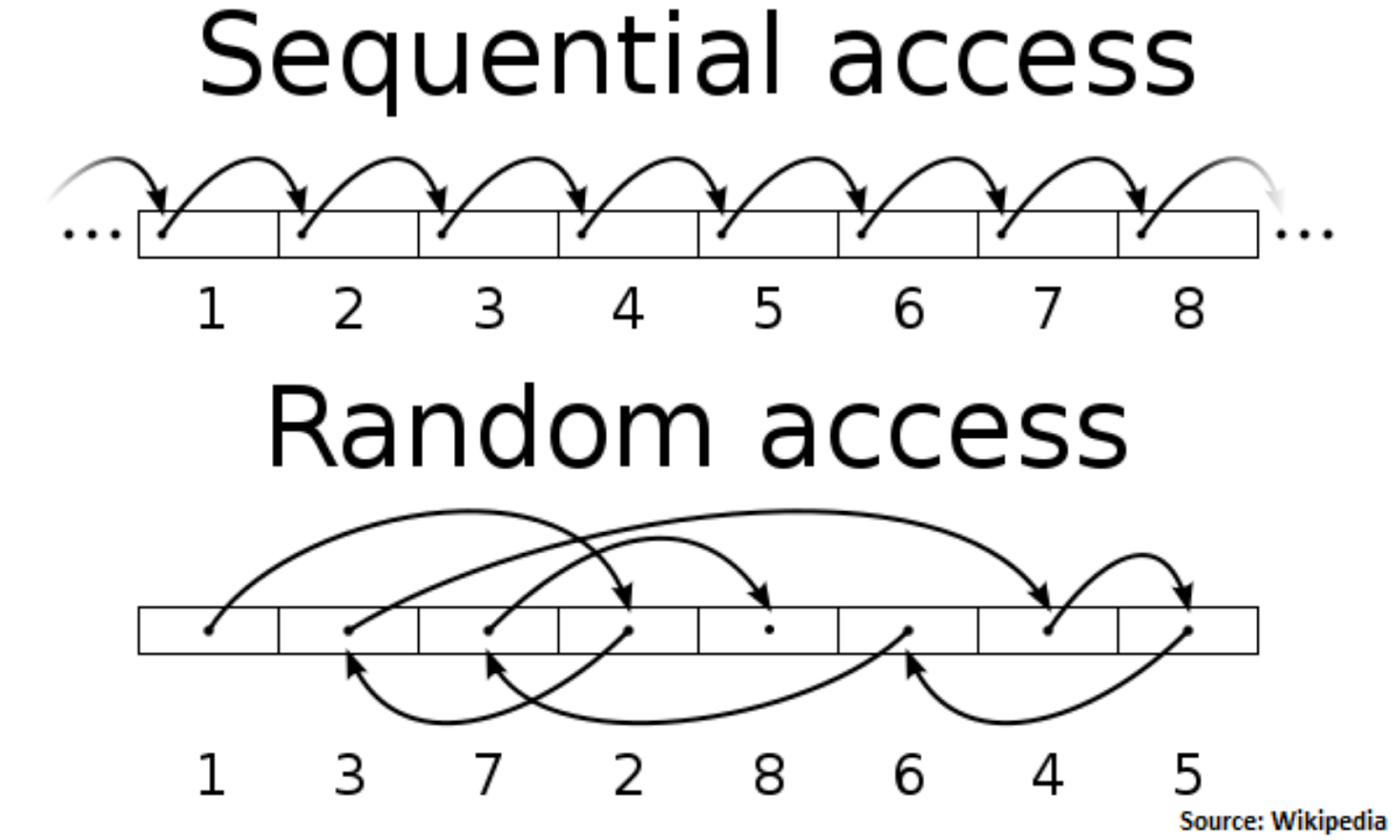
With batching and sequential I/O, Kafka performs I/O operations efficiently and turns a bursty stream of random message writes into linear writes.
Zero-Copy
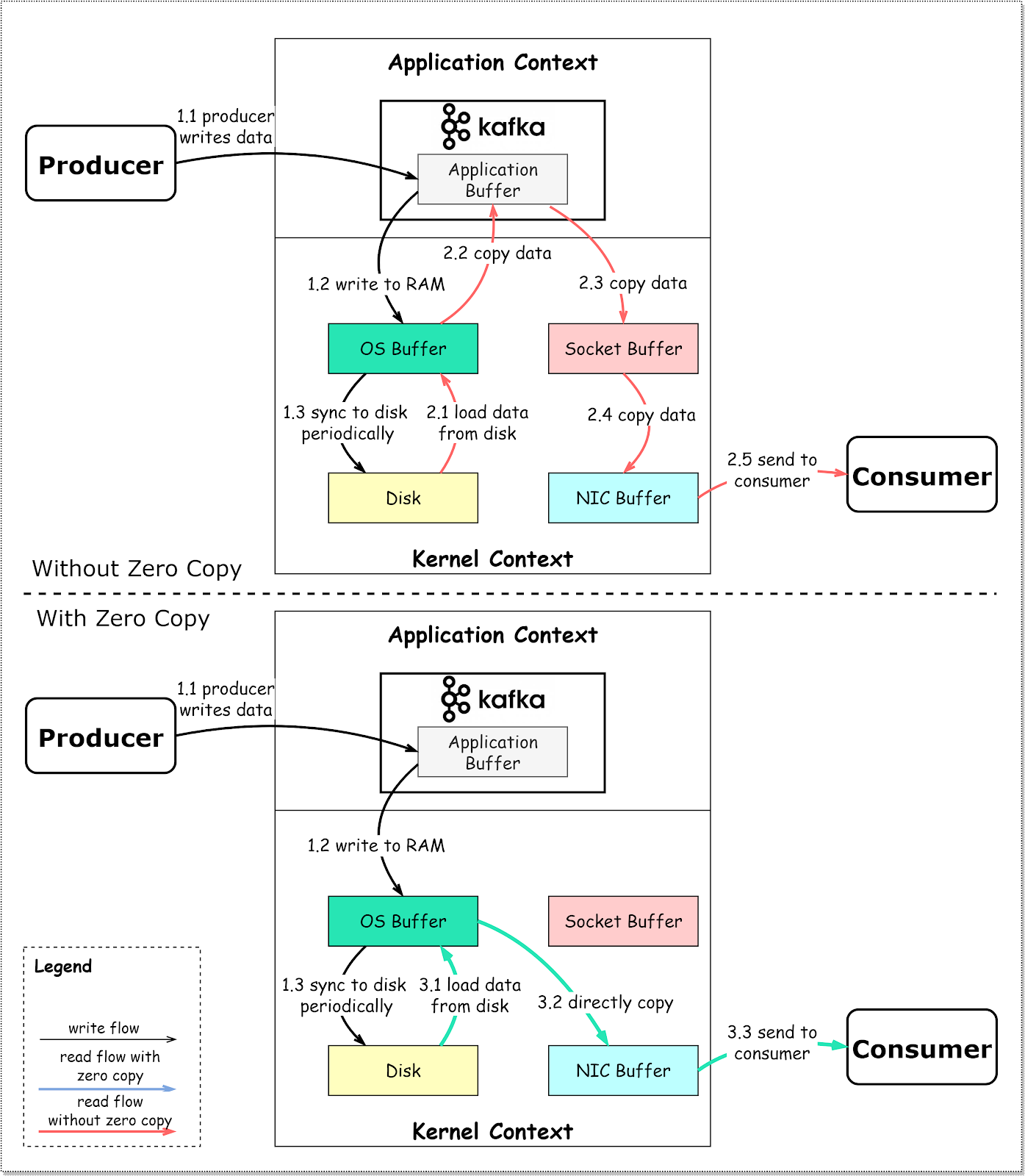
In the broker architecture, we talked about the network thread using zero-copy transfer to copy data on the disk directly to the socket buffer. The diagram below shows the details.
Step 1.1 - 1.3: Producer writes data to the disk
Step 2: Consumer reads data without zero-copy
2.1: The data is loaded from disk to OS cache
2.2 The data is copied from OS cache to Kafka application
2.3 Kafka application copies the data into the socket buffer
2.4 The data is copied from socket buffer to network card
2.5 The network card sends data out to the consumer
Step 3: Consumer reads data with zero-copy
3.1: The data is loaded from disk to OS cache
3.2 OS cache directly copies the data to the network card via sendfile() command
3.3 The network card sends data out to the consumer
Zero copy is a shortcut to save the multiple data copies between application context and kernel context. This approach brings down the time by approximately 65%.
Summary
In this issue, we discussed a complete view of Kafka’s architecture. From a high level, Kafka has two layers: the compute layer with APIs, and the storage layer with the brokers. Kafka optimizes data transmission and disk access to achieve high throughput, which makes it an ideal event-streaming platform for big data applications.


