
A Crash Course in Networking

The Internet has become an integral part of our daily lives, shaping how we communicate, access information, and conduct business. At its core, the Internet is a global system of interconnected computer networks that use standardized communication protocols to facilitate data exchange. This enables the transmission of text, images, videos, and more, across all sorts of devices.
In this issue, we dive into the essence of the Internet by exploring its key components: the network edges, access networks, network core, network protocols, and the Internet Protocol stack. We discuss how packet switching, forwarding, and routing work. We unravel the complexities of access networks and examine the crucial role protocols play in governing Internet activities. By the end, you will gain a comprehensive understanding of the Internet's architecture and its pivotal role in modern communication.
Internet Evolution
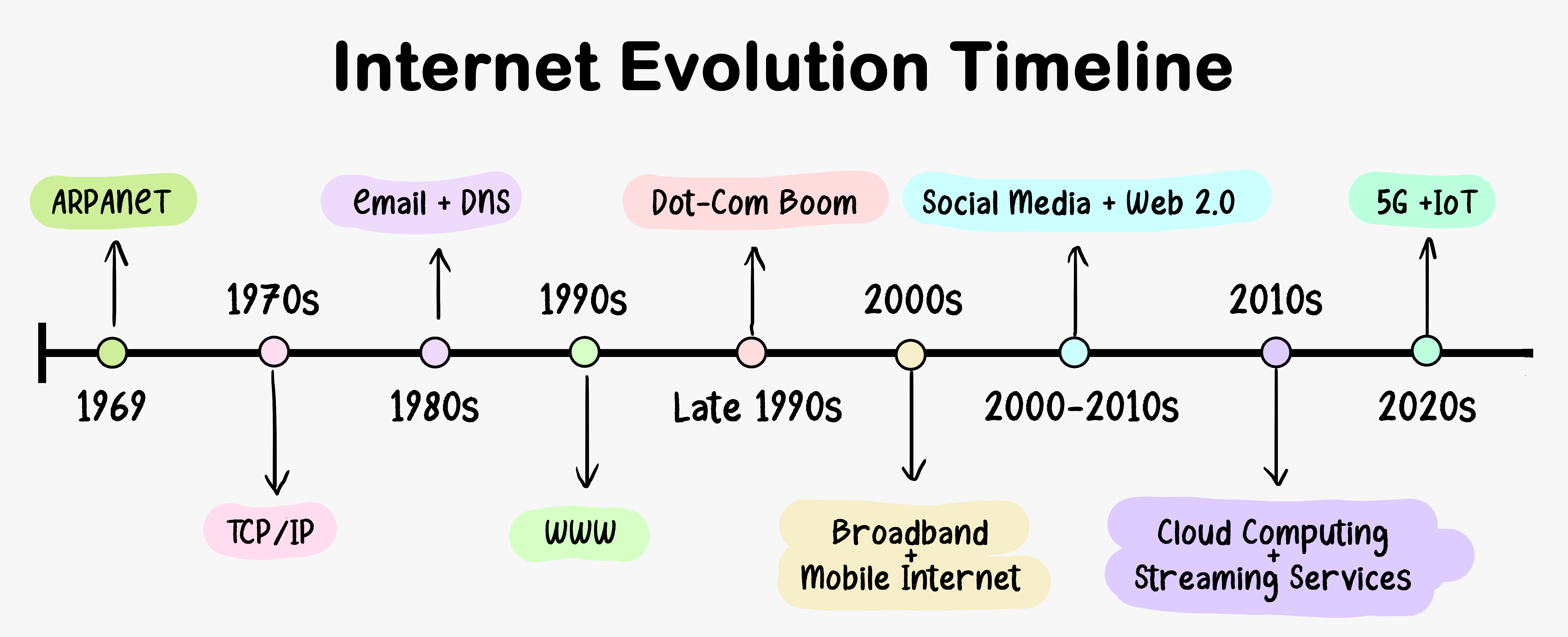
The evolution of the Internet is a fascinating journey spanning several decades, marked by groundbreaking developments and innovations. Here is a timeline of key milestones and transformative moments in the history of the Internet that have shaped the digital landscape we know today.
Components of the Internet
The Internet is a complex and interconnected network, consisting of several key components. We are going to explore the most important components of the Internet.
The Network Edge
The computers and other devices connected to the Internet are often referred to as end systems. They are called end systems because they sit at the “edge” of the Internet.
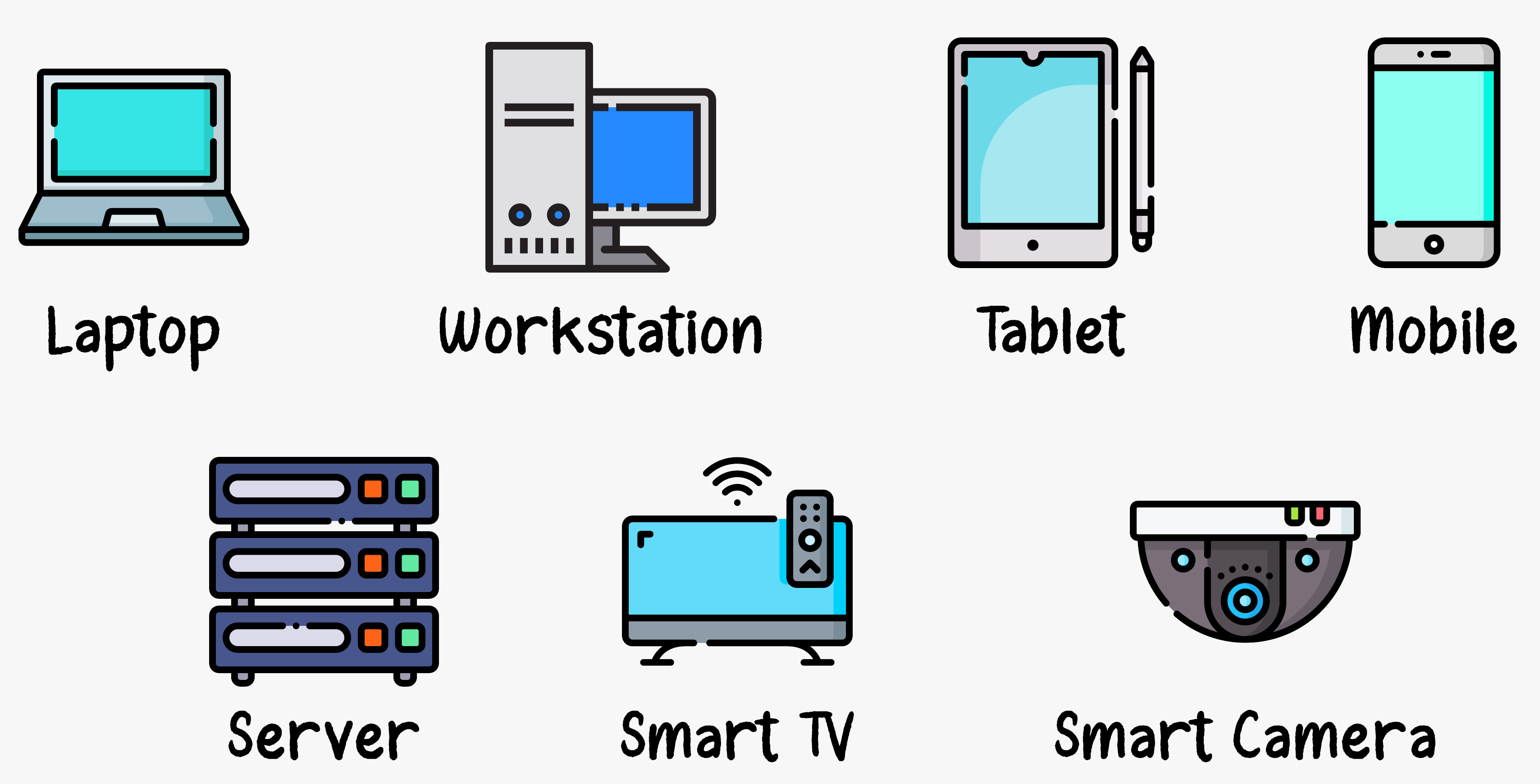
The Internet’s end systems include desktop computers, servers, mobile devices, and an increasing number of non-traditional “things” like smart appliances and IoT devices are being attached to the Internet as end systems.
End systems are also referred to as hosts because they host application programs such as a web browser, web server, e-mail client, or e-mail server.
Hosts are sometimes further divided into two categories: clients and servers. Informally, clients tend to be desktop and mobile PCs, smartphones, and similar personal computing devices, whereas servers tend to be more powerful machines that store and distribute web pages, stream video, relay e-mail, and similar services. Today, most of the servers providing search results, e-mail, web pages, and videos reside in large data centers.

Access networks
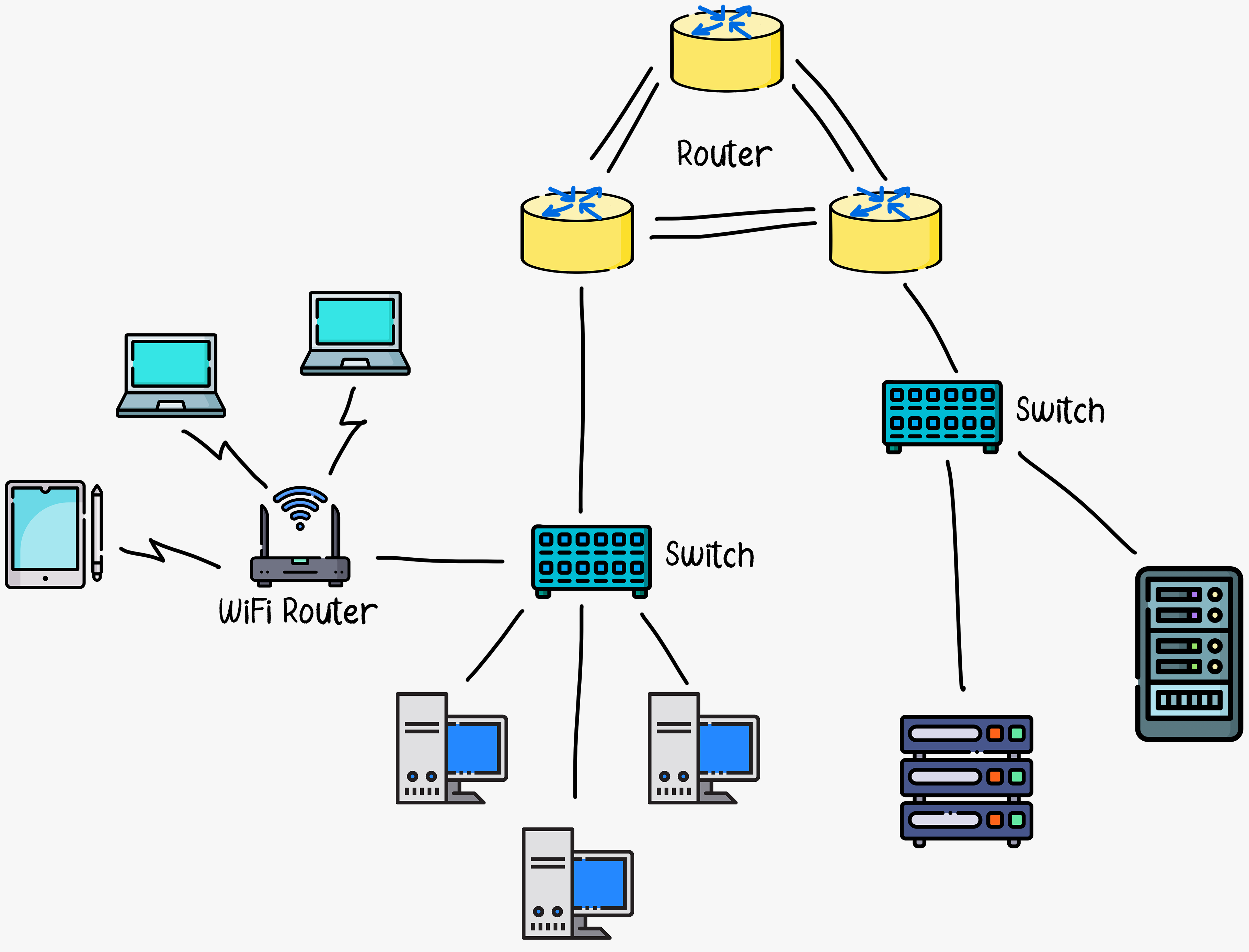
Having considered the applications and end systems at the “edge of the network,” let’s next consider the access network, which is the network that physically connects an end system to the first router (also known as the “edge router”) on a path from the end system to any other distant end system.
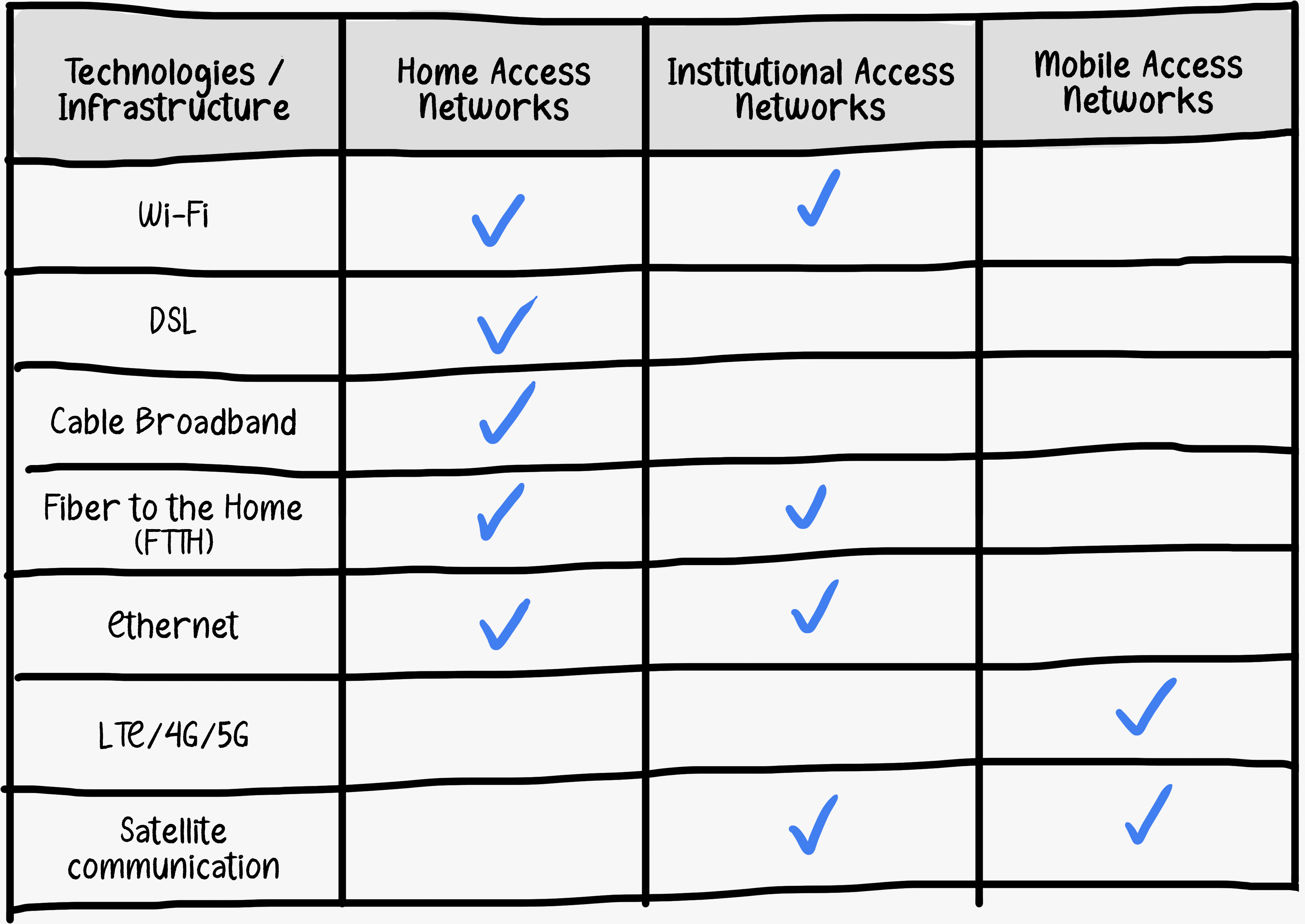
Access networks serve as the crucial link between end systems and the broader network infrastructure. Access networks can be broadly categorized into three types.
Home Access Networks
Home Access Networks refers to the set of technologies that enable connectivity and communication within a residential environment. This network allows devices within the home to connect to the Internet, share data, and communicate with each other.

Institutional Access Networks
Institutional Access Networks refers to the networking infrastructure and technologies used by organizations, institutions, and businesses to connect to the Internet and facilitate communication within their premises. These networks are designed to handle the specific needs and requirements of large-scale operations.
Mobile Access Networks
Mobile Access Networks refer to the various technologies that enable mobile devices, such as smartphones and tablets, to connect to the Internet and communicate with each other. These technologies facilitate wireless communication and data transfer for mobile users.
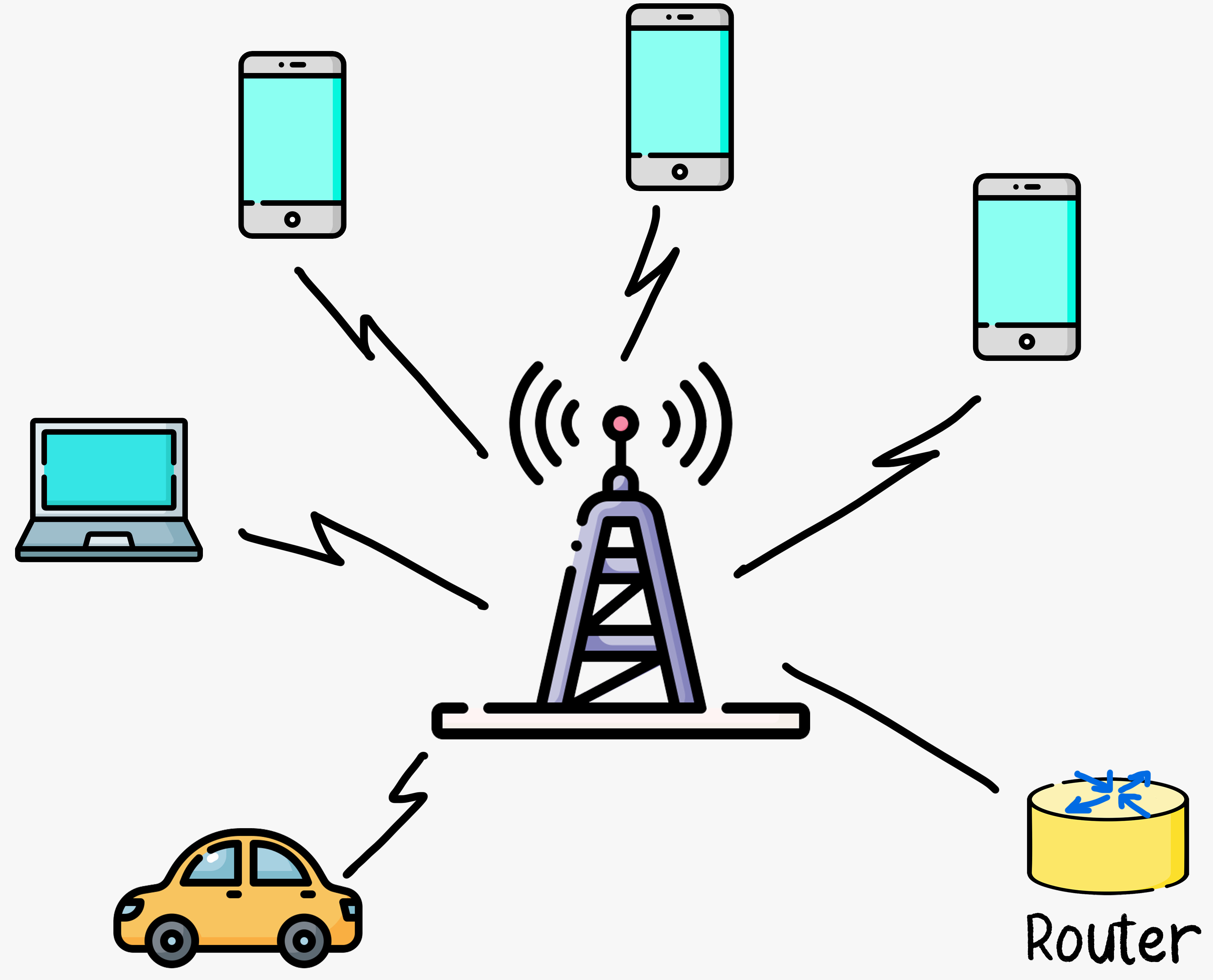
To provide last-mile connectivity between end-users and the Internet, there are various technologies and infrastructure. Here are some of the most common access network technologies used in home, institutional, and mobile access networks.
The Network Core
Having examined the Internet’s edge, let us now dive more deeply inside the network core, which is the mesh of packet routers and links that interconnect the Internet’s end systems.
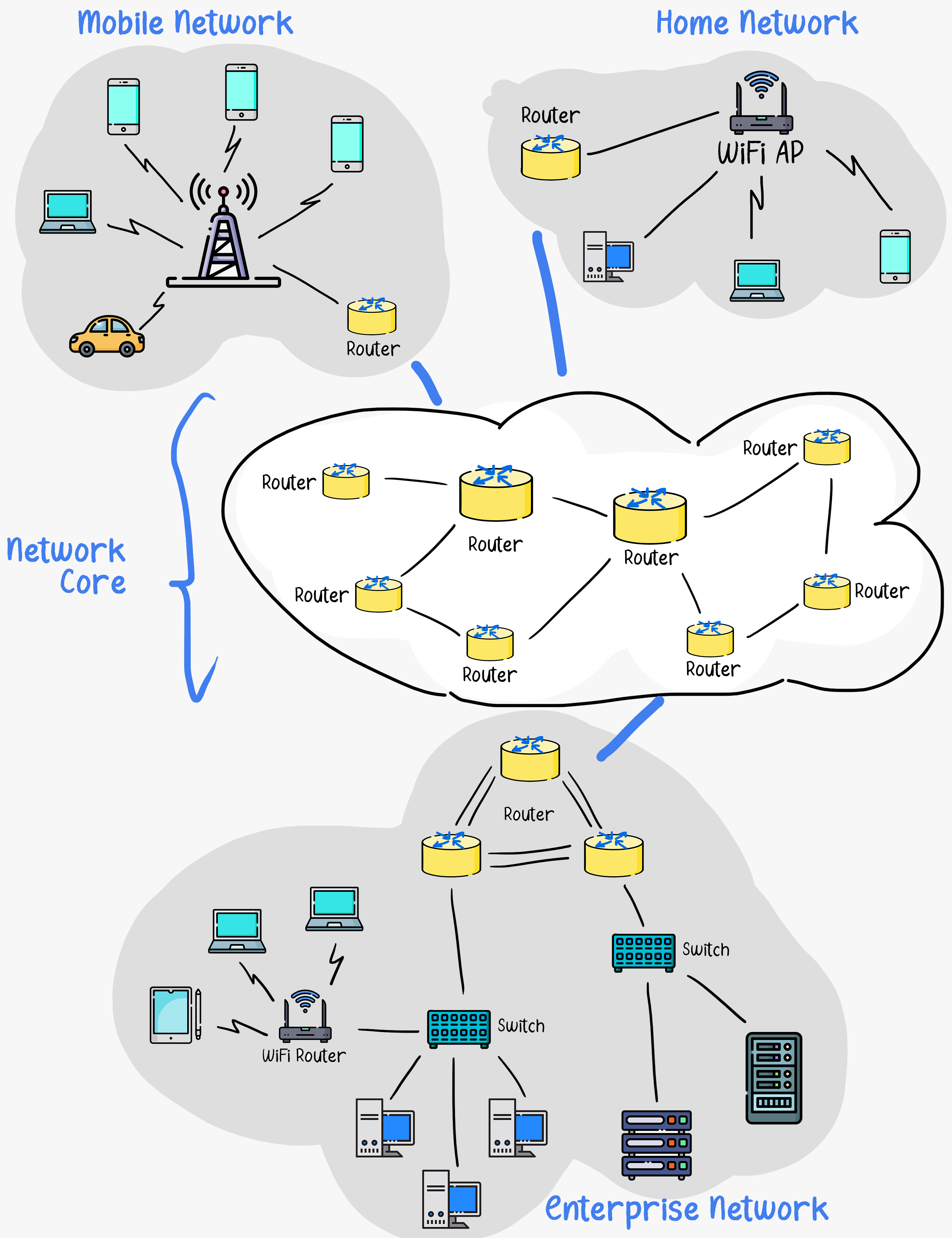
The Internet core operates based on the principle of Packet Switching. This means end hosts take application messages, divide those messages into chunks of data, put those chunks of data inside packets, and send those packets to the Internet. Each packet contains the destination address and is routed independently through the network. This allows many communication sessions to share the core network.
For example, a web server breaks down an application response into packets. The server sends these data packets, which hop from router to router across Internet backbone links until they reach the destination - a user’s laptop running a browser. The laptop reassembles the packets to reconstruct the web server’s response.
There are two key functions performed inside the network core: forwarding and routing.
Forwarding
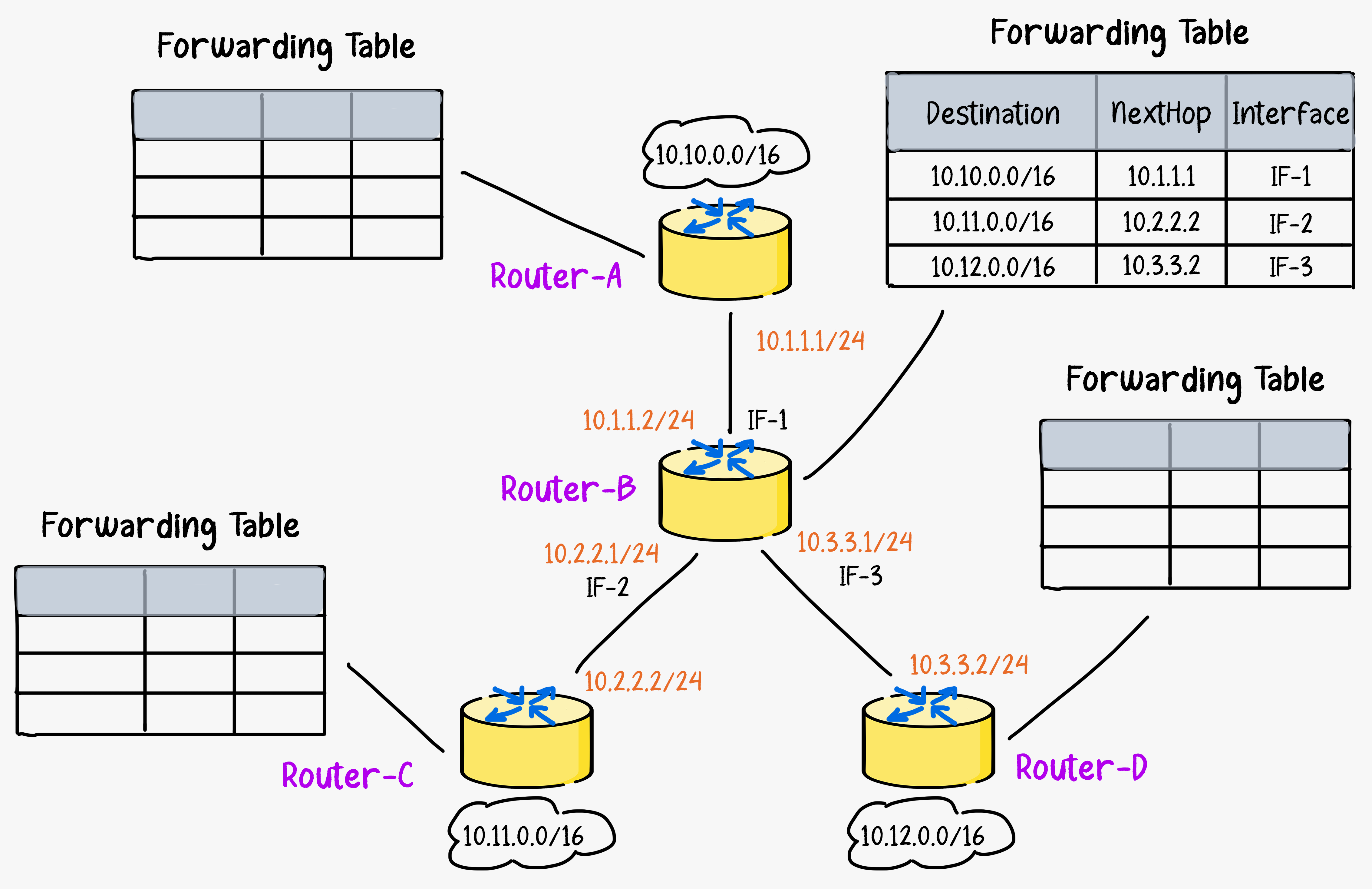
Forwarding is a local action of moving an arriving packet from a router’s input link to the appropriate router output link. Forwarding is controlled by a forwarding table inside each of the millions of routers on the Internet.
When a packet arrives, the router looks inside for the destination address and looks up that destination address in its forwarding table. It then transfers that incoming packet to the output link leading towards that destination.
Routing
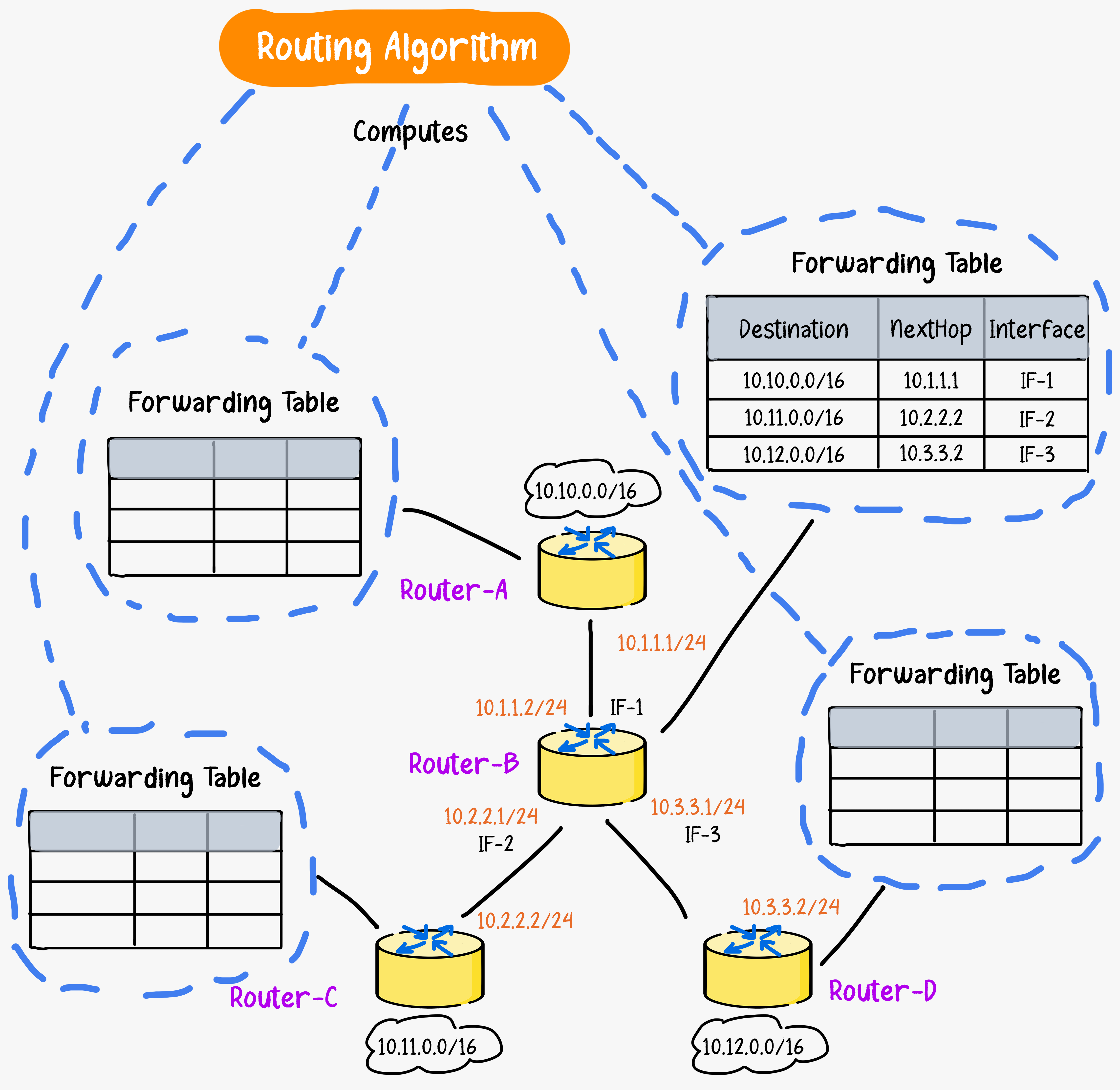
The forwarding tables that allow routers to move packets toward their destination are created by routing algorithms. Routing is the global process of determining the full paths packets take from source to destination.
Internet routing algorithms compute the shortest and most efficient paths between any two points on the global network. They take into account the current network conditions and traffic flows to create optimal routes. The algorithms determine appropriate paths and populate each router's forwarding table with the next hop to efficiently reach network destinations.
Network Protocols
All activity on the Internet involving communication between networked devices is governed by protocols that provide standard rules. Protocols define message formats, ordering of message exchanges, and expected responses that allow proper communication between devices.
Protocols implemented at the hardware level control the transmission of bits between two physically connected network interface cards. Congestion control protocols regulate the rate at which end systems send packets back and forth. Routing protocols map out the path each packet should traverse between source and destination. Protocols coordinate all activities within networks.
Some common examples include Transmission Control Protocol (TCP) which supports reliable data delivery, Internet Protocol (IP) for logical addressing, Hypertext Transfer Protocol (HTTP) defining web traffic structure, and File Transfer Protocol (FTP) for file transfers. Each serves a specific purpose within the network, such as ensuring reliable data delivery, addressing, routing, and managing different types of network services.
Standardization comes from the Internet Engineering Task Force (IETF), which publishes technical standards called RFCs (Request for Comments). These specifications allow diverse hardware and software implementations to achieve interoperability.
The Internet Protocol Stack (TCP/IP Stack)
The Internet, as you may have gathered, is an immensely complex system. It consists of numerous applications and protocols, diverse end systems, packet switches, and a variety of link-level media. Given this complexity, is there any hope of organizing a network architecture effectively? Fortunately, the answer is yes.
To provide structure to the design of network protocols, network designers organize protocols, and the network hardware and software that implement the protocols, in layers. Each protocol belongs to one of the layers. Each layer provides its service by (1) performing certain actions within that layer and by (2) using the services of the layer directly below it. When taken together, the protocols of the various layers are called the Protocol Stack.
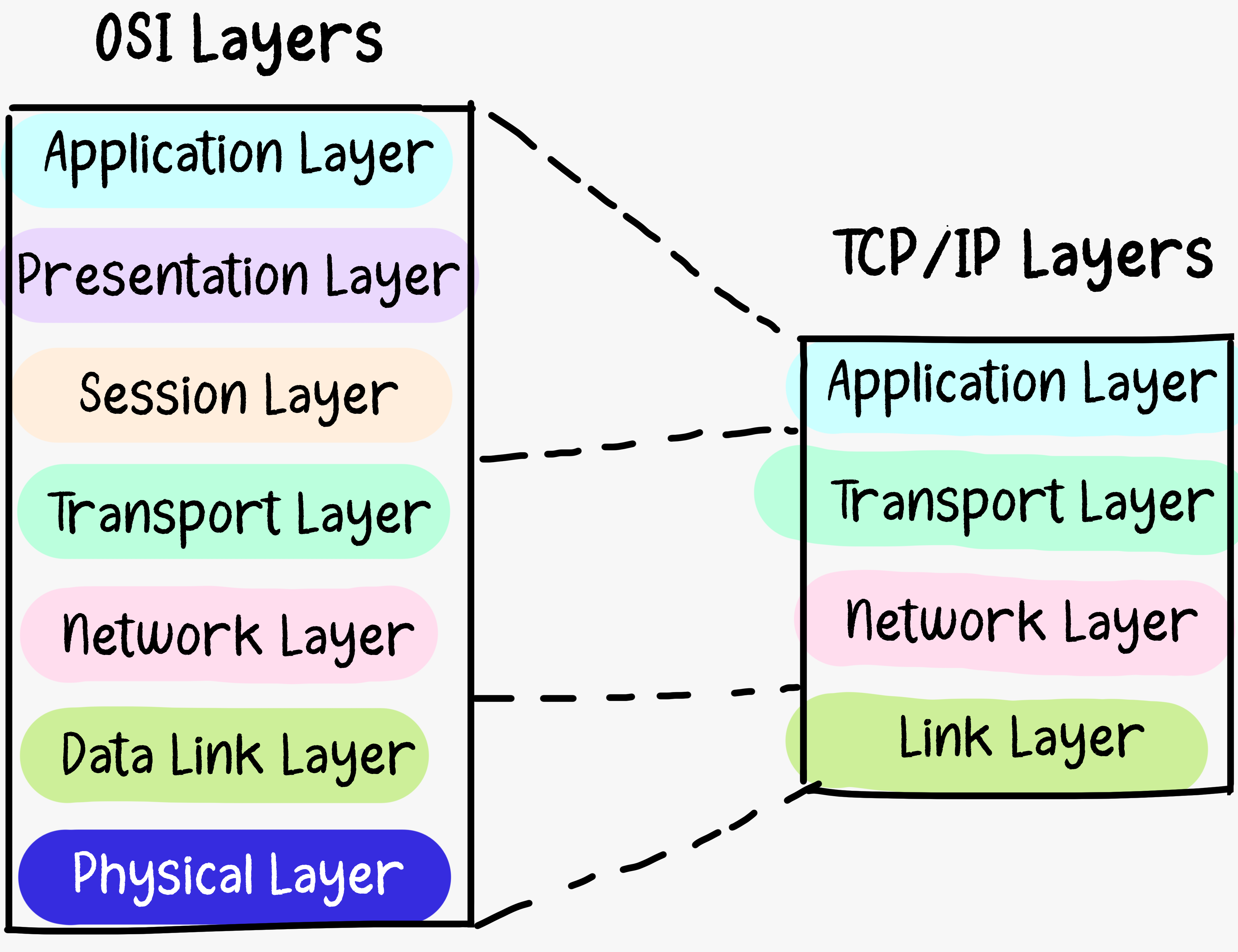
The Internet Protocol stack, also known as the TCP/IP stack, is a conceptual framework that standardizes the protocols used for communication over the Internet and most computer networks. It is a set of networking protocols that enables computers and devices to communicate and exchange data with each other. While the OSI (Open Systems Interconnection) model famously outlines seven layers, the TCP/IP model typically consolidates these into four layers.
Application Layer
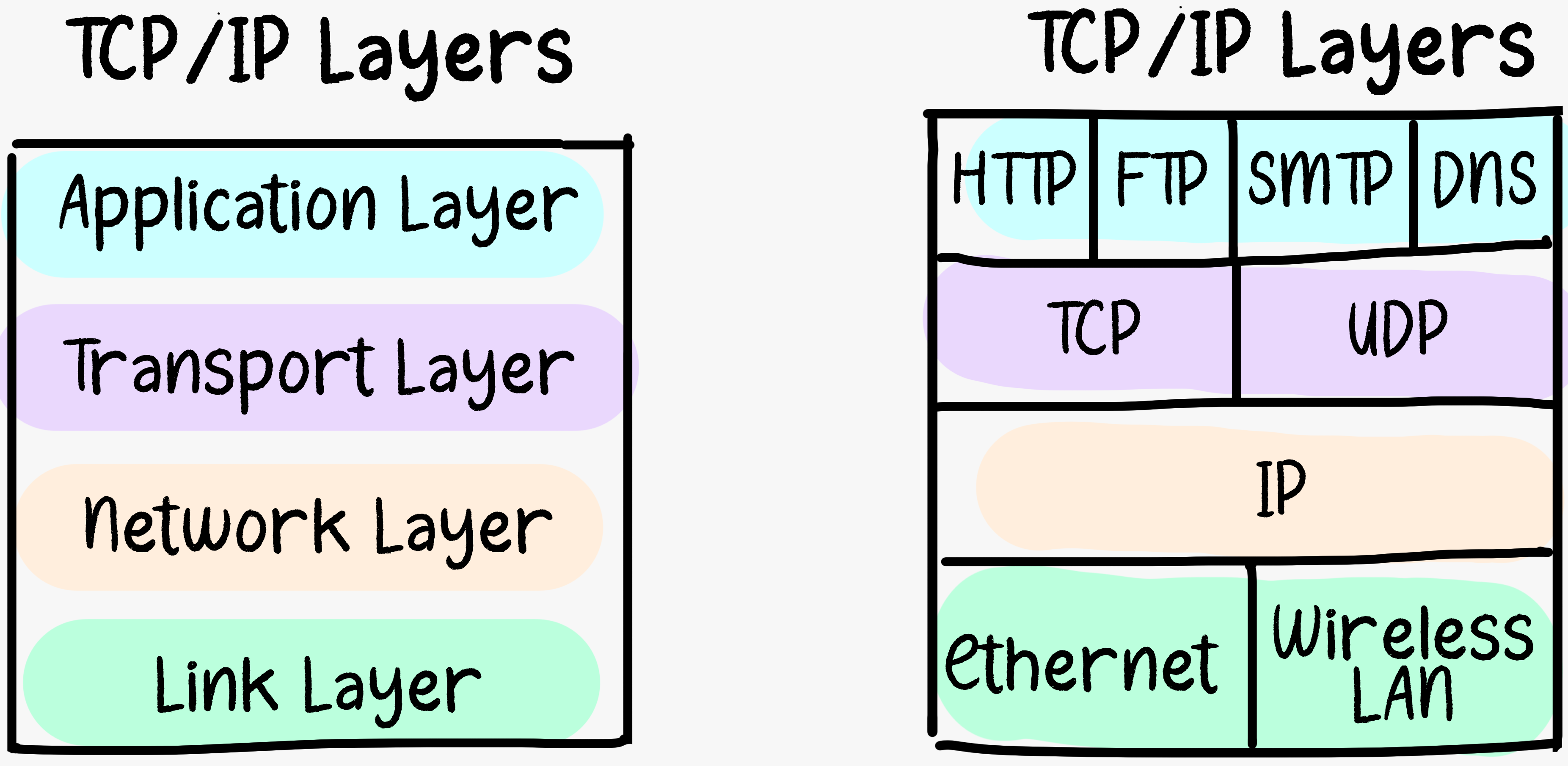
The top layer of the TCP/IP stack is the Application Layer, responsible for providing network services directly to end-users or applications. It includes protocols such as HTTP (Hypertext Transfer Protocol), FTP (File Transfer Protocol), SMTP (Simple Mail Transfer Protocol), and DNS (Domain Name System). This layer deals with high-level communication and user interfaces.
Transport Layer
The Transport Layer is responsible for end-to-end communication between devices. It ensures that data is reliably and efficiently transferred between applications on different devices. The most common protocols at this layer are TCP (Transmission Control Protocol), which provides reliable, connection-oriented communication, and UDP (User Datagram Protocol), which provides faster, connectionless communication.
Network Layer
The Network Layer is where IP (Internet Protocol) resides. It handles the addressing and routing of data packets between devices across different networks. This layer primarily encompasses the IP protocol, which is essential for all Internet components with a network layer. The Internet’s network layer also contains routing protocols that determine the routes that datagrams take between sources and destinations.
There are many routing protocols and since the network layer contains both the IP protocol and numerous routing protocols, it is often simply referred to as the IP layer, reflecting the fact that IP is the glue that binds the Internet together. IPv4 (Internet Protocol version 4) and IPv6 (Internet Protocol version 6) are the two main versions of IP used in this layer.
Link Layer
The Link Layer, also known as the Network Interface Layer or Data Link Layer, is responsible for the physical connection between devices on the same network segment. It deals with the protocols and hardware addressing, such as MAC (Media Access Control) addresses. Ethernet is a common protocol used at this layer.
These layers work together to enable communication across networks. Data is encapsulated at each layer as it moves down the protocol stack on the sender's side and decapsulated as it moves up the stack on the receiver's side.
The TCP/IP model is widely used for internet communication and is the foundation for the modern internet.
Summary
In this issue, we explored the role of end systems, access networks, and the network core in the Internet. The Internet operates on the principles of packet switching, with forwarding and routing playing crucial roles in its core functionality. Network protocols, governed by entities like the Internet Engineering Task Force (IETF), form the backbone of Internet communication. The Internet Protocol (IP) stack provides a structured framework for organizing the complexity of Internet architecture. This layered approach ensures seamless communication across networks, making the TCP/IP model the bedrock of modern Internet communication.


