
API Security Best Practices

APIs are the backbone of modern applications. They expose a very large surface area for attacks, increasing the risk of security vulnerabilities. Common threats include SQL injection, cross-site scripting, and distributed denial of service (DDoS) attacks.
That's why it's crucial to implement robust security measures to protect APIs and the sensitive data they handle. However, many companies struggle to achieve comprehensive API security coverage. They often rely solely on dynamic application security scanning or external pen testing. While these methods are valuable, they may not fully cover the API layer and its increasing attack surface.
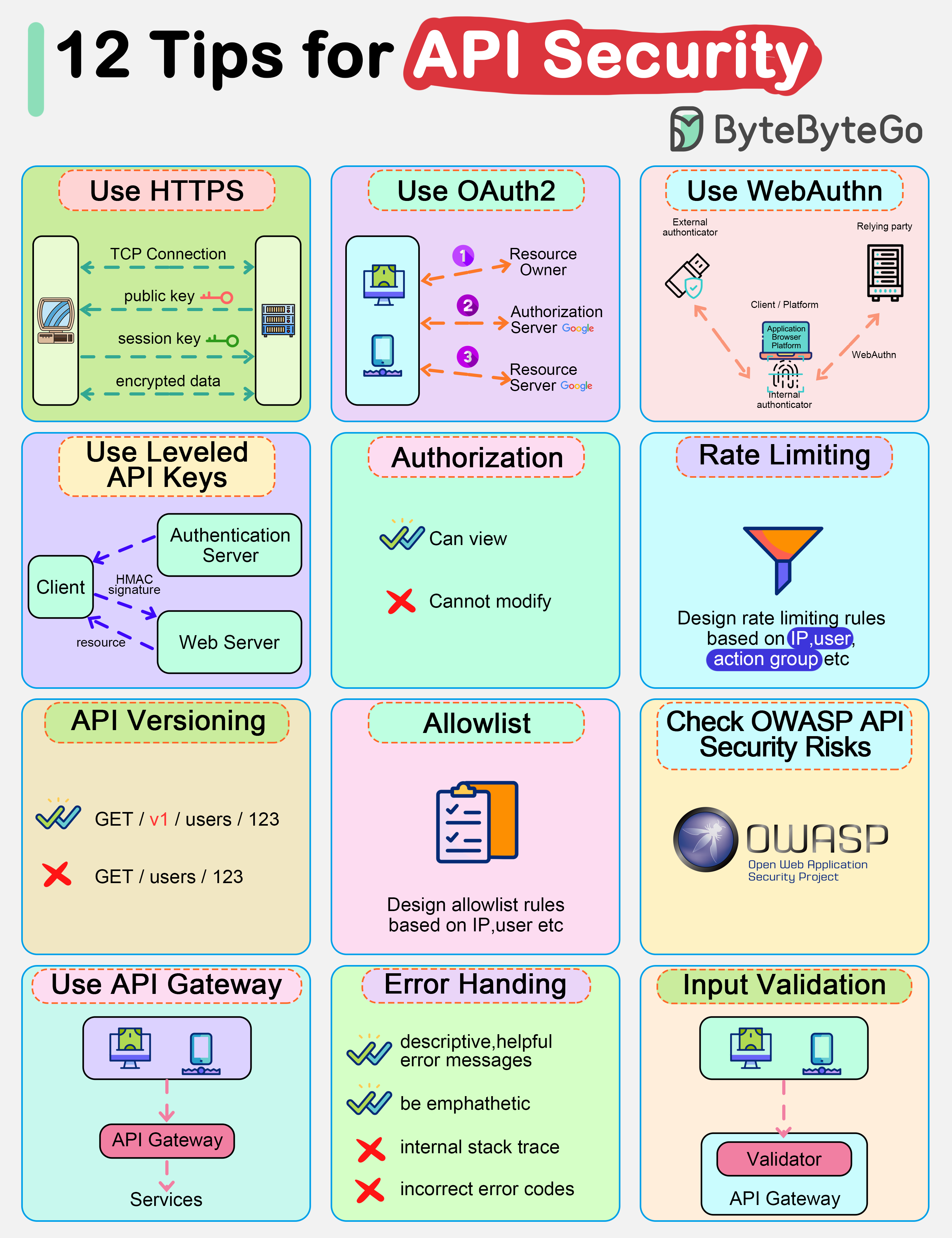
In this week’s issue, we'll explore API security best practices. From authentication and authorization to secure communication and rate limiting, we’ll cover essential strategies for designing secure APIs.
Authentication
Authentication ensures that only authorized users or applications can access protected resources or API endpoints. Before implementing authentication, choosing the appropriate authentication mechanism is crucial based on our use case, security requirements, and compatibility with client applications.
Below are some popular authentication mechanisms for securing APIs:
OAuth2
OAuth2 is an industry-standard authorization protocol that allows users to grant third-party applications limited access to their resources without sharing credentials directly.
Let’s understand the OAuth2 flow with an example:
Imagine a mobile app that needs to access a user’s profile information from Facebook or Google. The app redirects the user to the Facebook or Google authorization server. The user authenticates with the chosen service and grants the app permission to access their profile information. The authorization server then issues an access token to the app. The app uses this access token to make API calls to access the user’s profile data. The API validates the token and responds with the requested data or action.
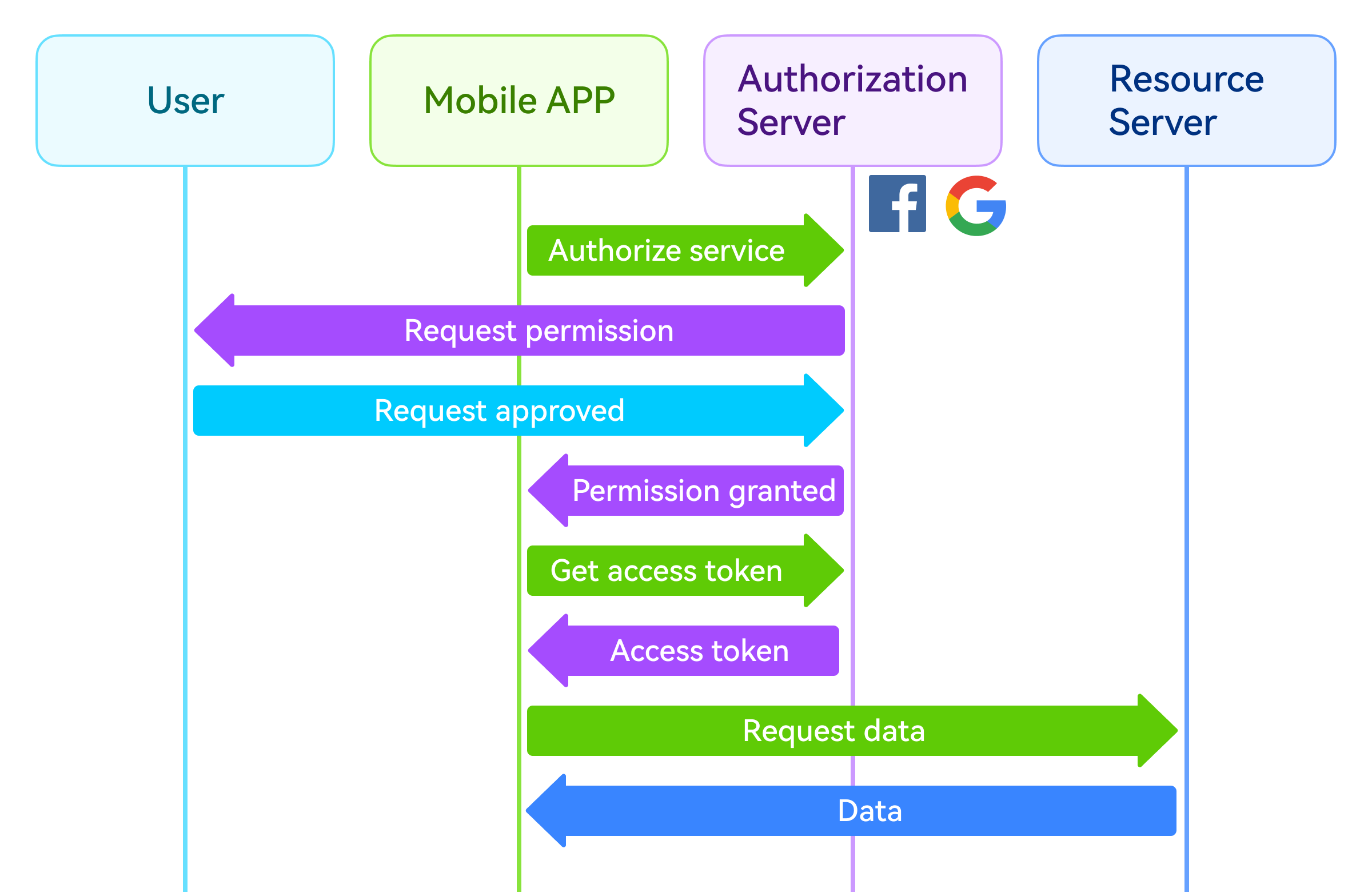
In this way, credentials are never shared – only temporary access tokens are used. This enhances security by eliminating the need to store user passwords and enabling secure integration with third-party services. Popular use cases include logging in with Google or Facebook, accessing cloud storage, or connecting to email/calendar APIs.
Here's another concrete example:
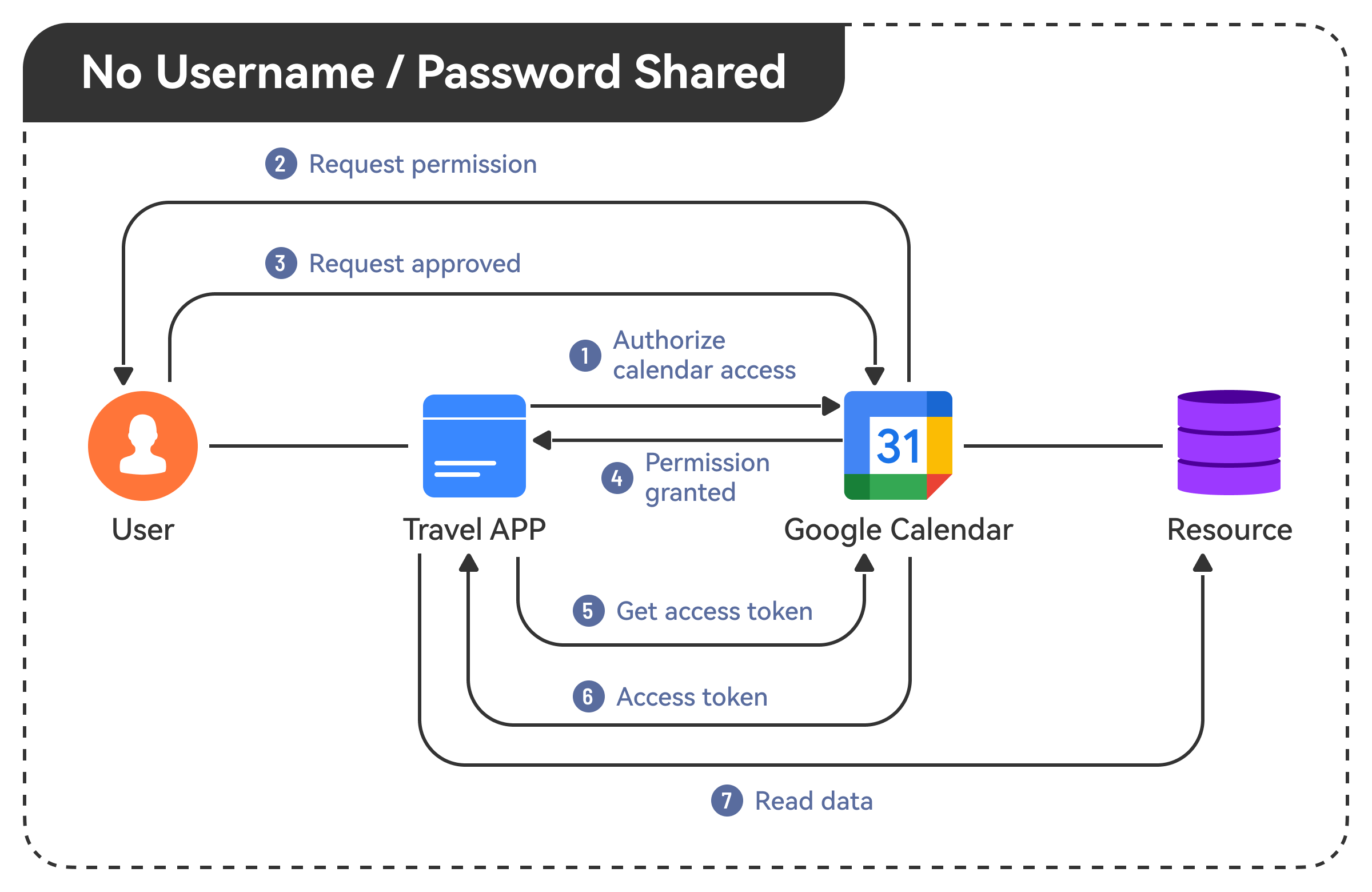
Say we build a travel app that needs access to a user's Google Calendar to check availability. The app redirects the user to Google for authentication and permission. Google then provides an access token that the app can use to read the user's calendar events without storing usernames or passwords.
WebAuthn
WebAuthn, or Web Authentication, is a newer standard that provides a more secure and user-friendly way of authenticating users. It replaces traditional password-based authentication with public-key cryptography and biometric factors like fingerprints or facial recognition. This makes it much harder for attackers to compromise user accounts through techniques like phishing or credential stuffing.
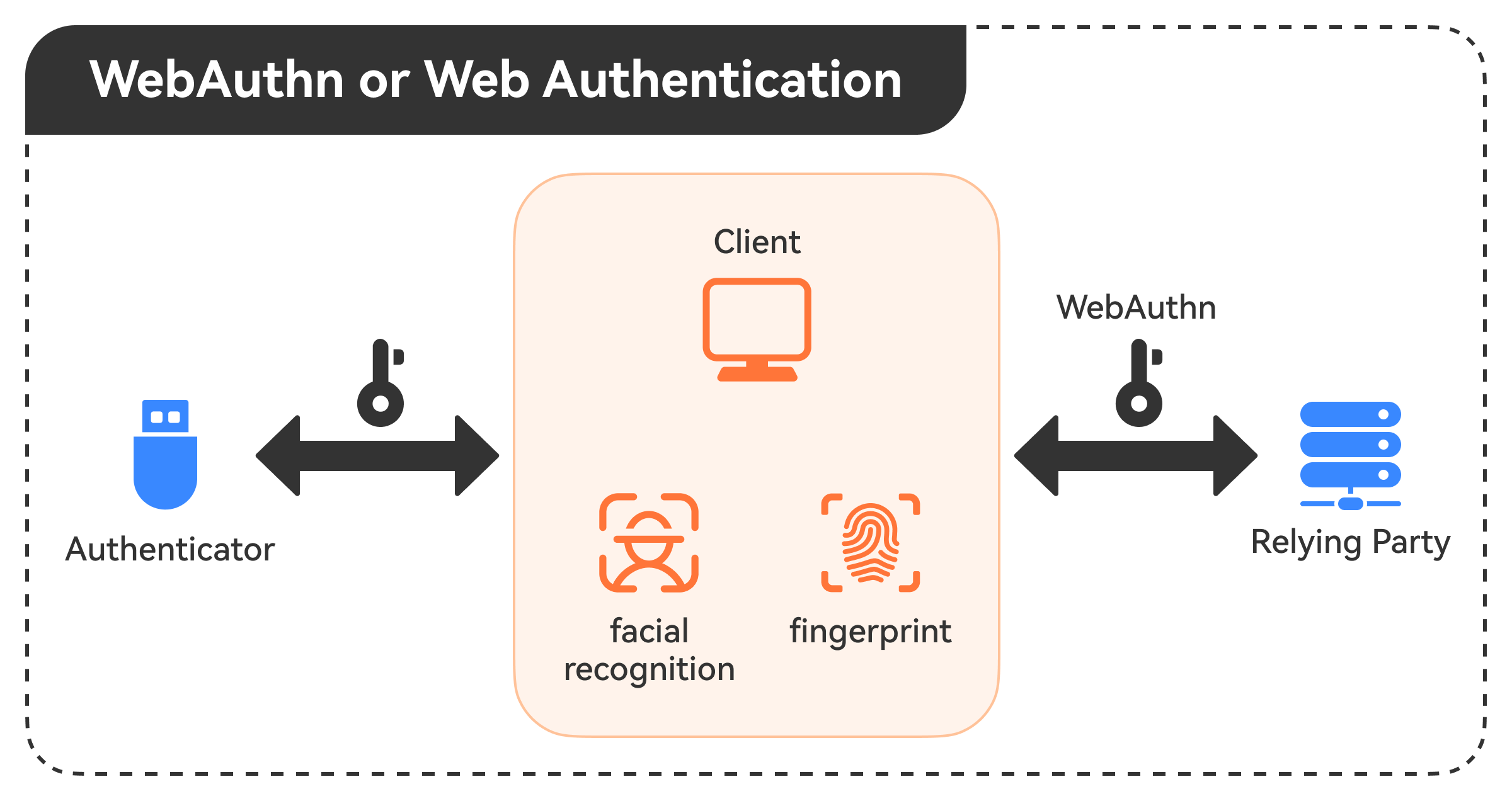
💡Note: WebAuthn is supported by major browsers and platforms, making it a robust and future-proof authentication solution for APIs.
Leveled API Keys
API keys are a common way to authenticate and authorize service-to-service communications, such as when our backend services need to access third-party APIs or internal APIs. However, using a single API key for all services and operations can be risky.
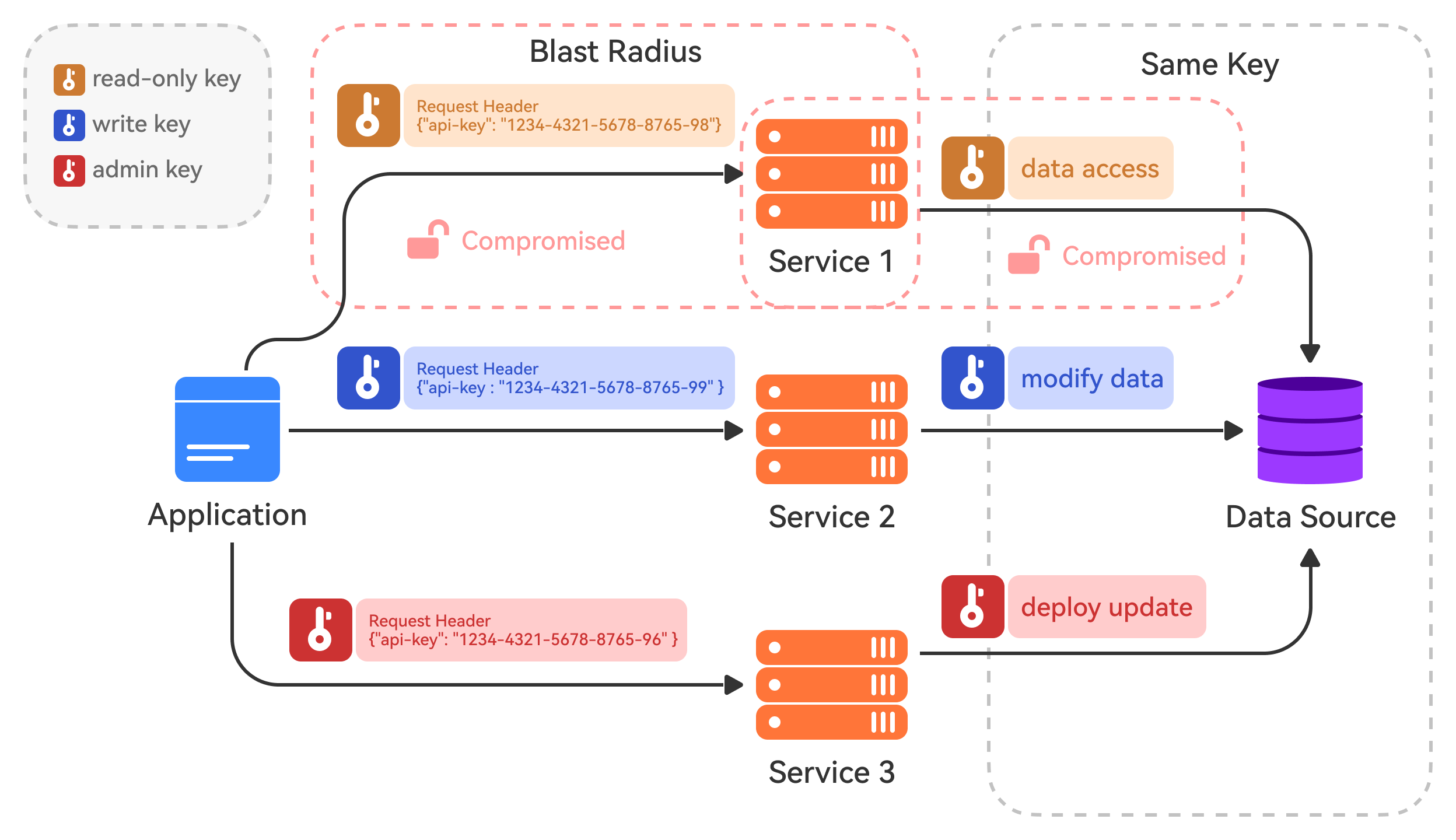
Instead, implement leveled API keys, where each key has specific permissions and scopes defined. For example, we could have a read-only key for public data access, a write key for modifying internal data stores, and an admin key for privileged operations like deploying updates.
This way, even if one API key is compromised, the attacker's access is limited to the operations allowed by that key's level. This minimizes the blast radius compared to using a single master key.
💡Note: It's also a good practice to rotate API keys periodically and have an easy way to revoke compromised keys immediately.
Authorization
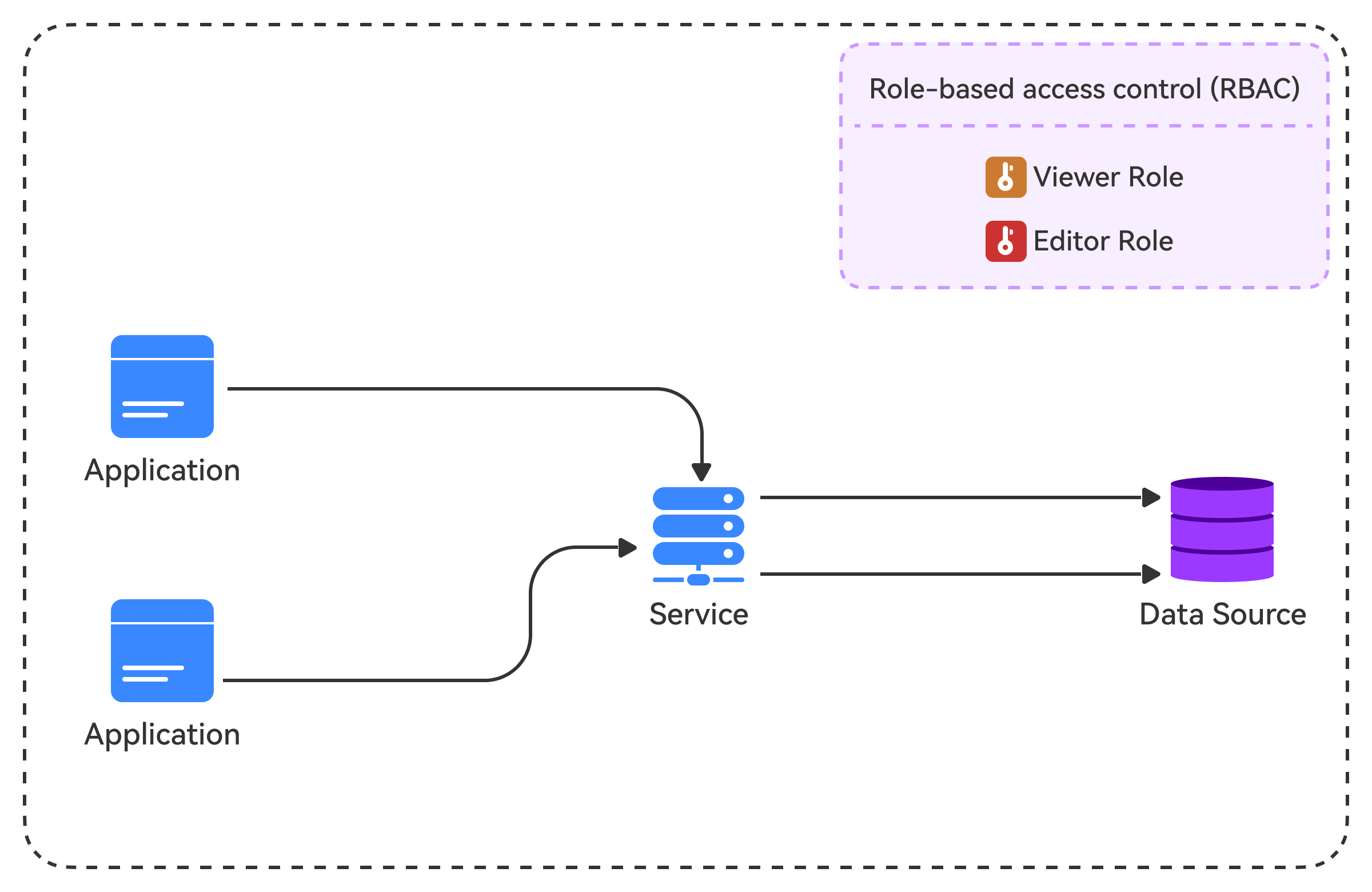
Authorization is the process of determining what resources and actions a client is allowed to access or perform. Even if a client is authenticated, they should only be able to access and modify the data they're authorized for. A common pattern is to use Role-Based Access Control (RBAC), where clients are assigned roles with specific permissions. For example, a "viewer" role might be able to read data, while an "editor" role can also modify it.
Another authorization mechanism is Attribute-Based Access Control (ABAC), which defines access control policies based on attributes such as user, resource, and environmental attributes. ABAC provides more flexibility than traditional RBAC by allowing us to define access control rules based on contextual attributes.
💡Note: Proper authorization ensures that our API follows the principle of least privilege, minimizing the potential attack surface.
Secure Communication
Securing communication is crucial for protecting the confidentiality, integrity, and authenticity of data exchanged between clients and the API server. Implement HTTPS (HTTP over TLS) for API communications. HTTPS is the secure version of HTTP, encrypting data transmitted between the client and server. TLS (Transport Layer Security) provides encryption to prevent eavesdropping, man-in-the-middle attacks, and other security threats.
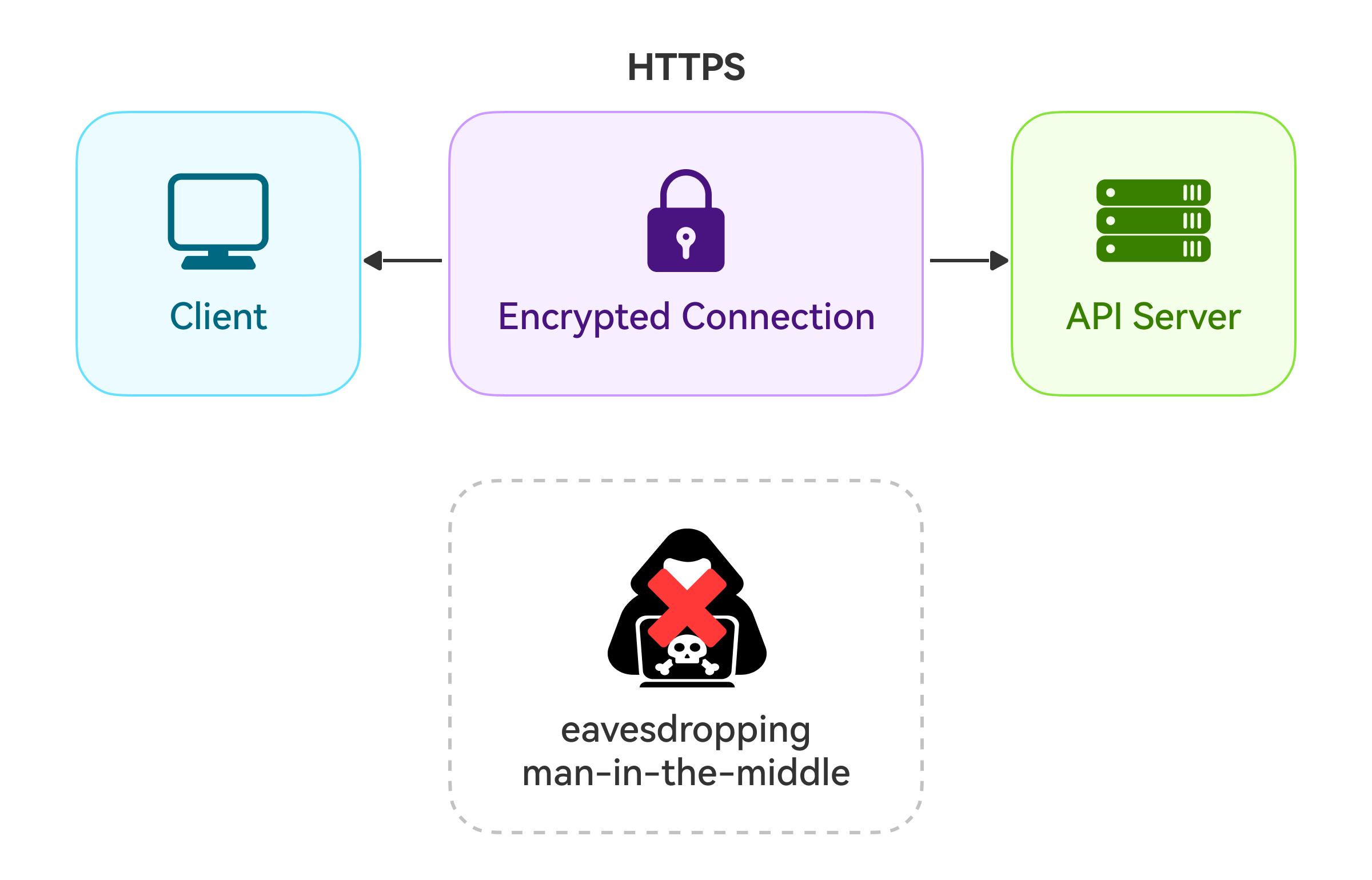
With HTTPS, sensitive information like API keys, session tokens, and user data are protected from prying eyes.
Rate Limiting
Rate limiting is an important security measure that controls the number of requests a client can make within a given time period. This helps protect our APIs from being overwhelmed by malicious actors or buggy clients making excessive requests.
Rate-limiting rules can be based on various factors, such as IP address, user ID, or API key. Different rate limits can be set for different types of requests or resources. For example, we might allow more read requests than write requests per second.
Here are some common rate-limiting algorithms:
Token Bucket: Tokens are added to a bucket at a fixed rate, and requests are allowed only if tokens are available in the bucket. This algorithm provides burst tolerance and smooth rate limiting.
Leaky Bucket: Requests are processed at a constant rate, with excess requests overflowing like water from a leaky bucket. This algorithm provides a constant average rate of request processing.
Fixed Window: Requests are counted within fixed time windows (e.g., per second, per minute), and once the limit is reached, further requests are rejected until the next window begins.
Rate limiting improves security and helps maintain the performance and availability of our APIs.
API Versioning
Implementing API versioning is a best practice that allows us to evolve the API over time while maintaining backward compatibility. We can introduce breaking changes or new features with versioning without disrupting existing clients.
Here are some common versioning schemes:
URI Versioning: In this method, the version scheme is added as part of the URI. The image below shows an example. The version scheme comes right before the widget’s resource. In some cases, we can put it after the resource, but only when we want to apply it to a particular resource or API method.
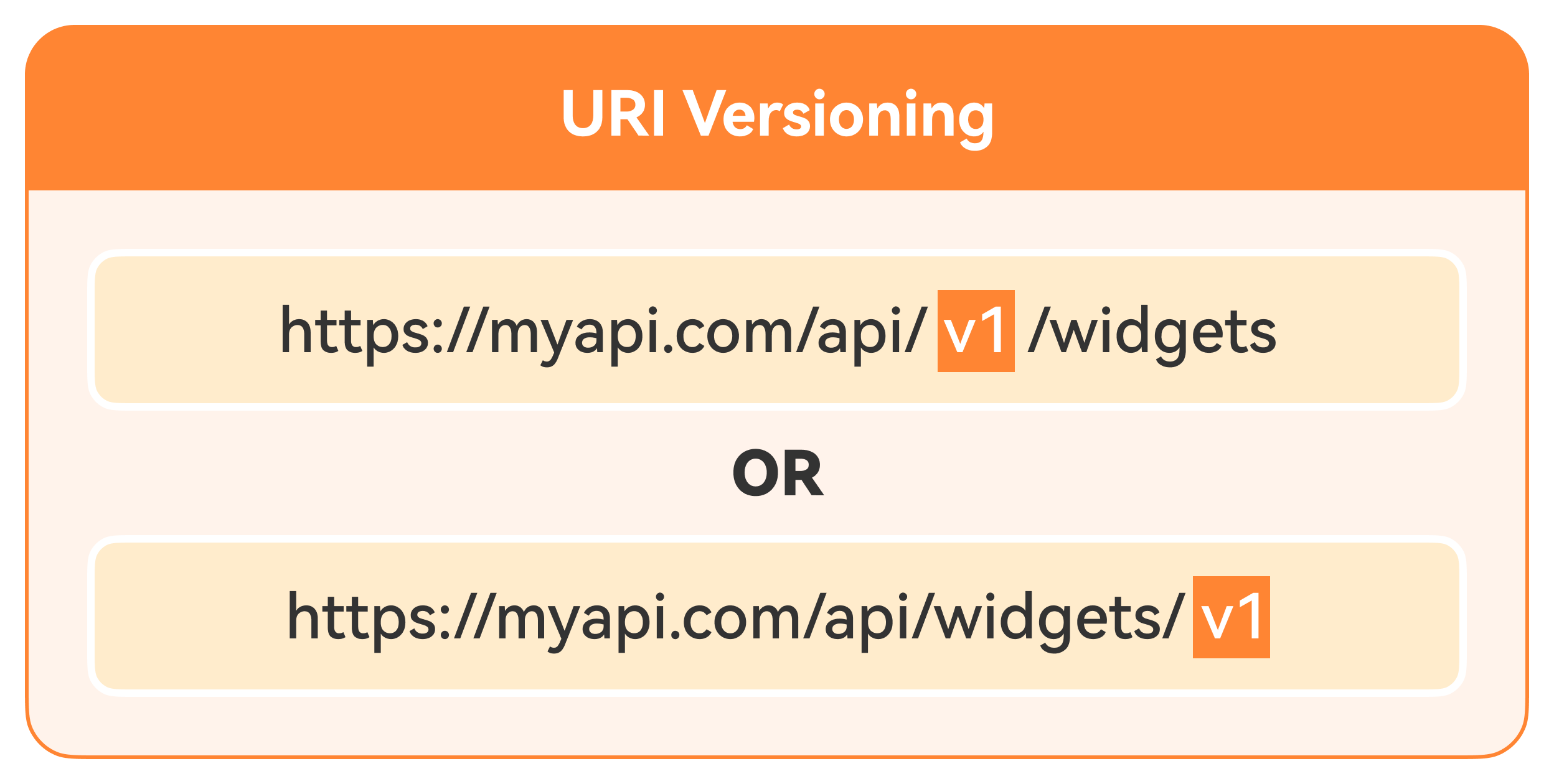
💡Note: If we want to use the version scheme for a whole suite of API methods, it’s best to place it before the resource.
Query Parameter Versioning: In this method, we specify the version number as a query parameter in API requests.
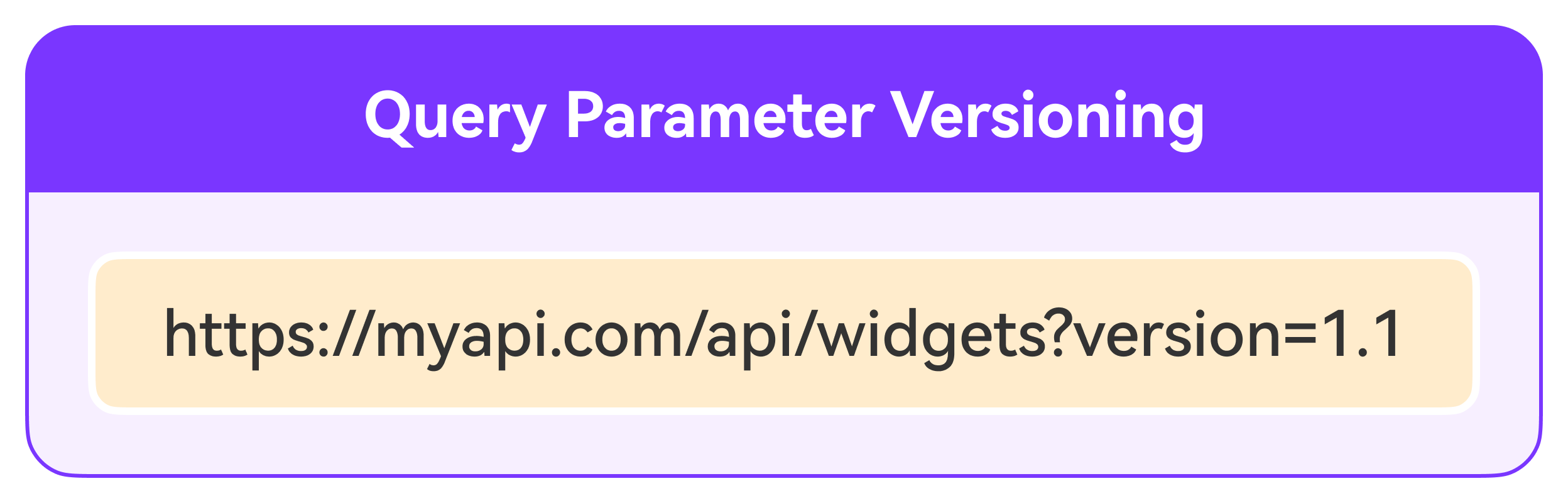
💡Note: Query parameter versioning keeps URIs cleaner but may not be as explicit as URI versioning.
Header Versioning: We can specify versions using HTTP headers by creating custom headers or using the “accept” content type header. Instead of putting the version scheme in the URI, we use headers, as shown in the example below.
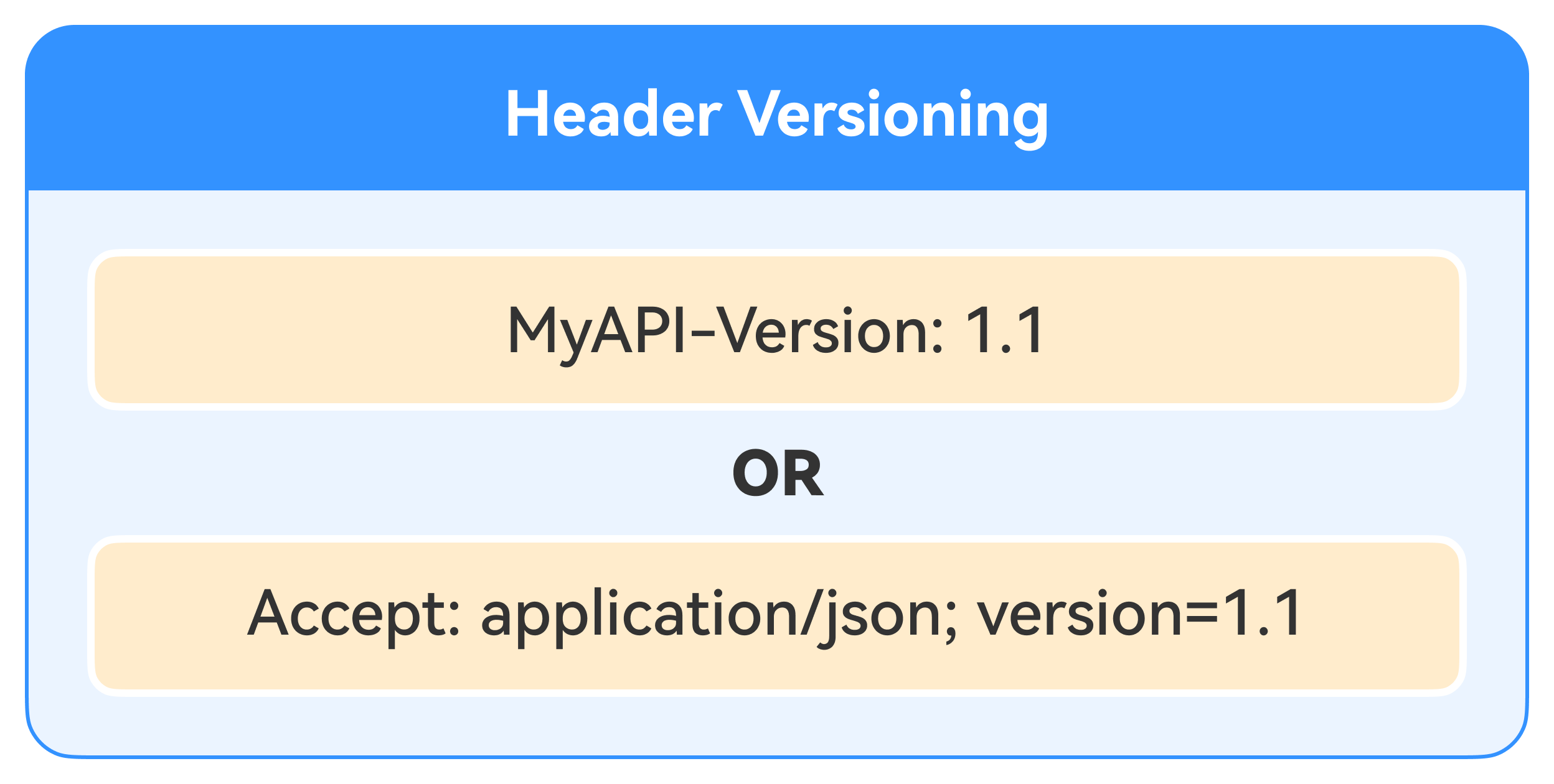
One advantage of this approach is that it keeps URIs clean and reduces clutter. However, it makes debugging harder because the version is less visible. It can also cause issues with client caching if the client mistakenly treats requests to different versions as the same request.
Allow Listing
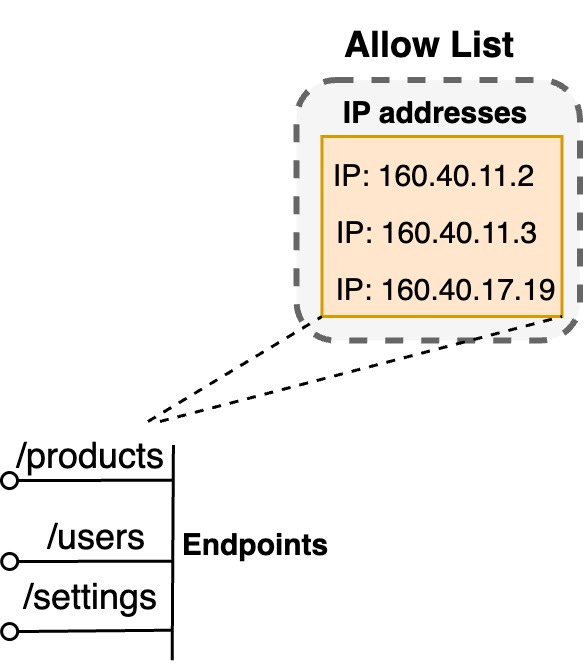
Allow listing is a security technique in which we explicitly allow access only to a predefined set of trusted entities, such as IP addresses, user IDs, or API keys. Everything else is denied by default. This approach follows the principle of "deny all, permit some," which is more secure than a deny listing approach, where we deny access to a few known bad actors and allow everyone else.
We can implement allow listing rules based on various criteria in the context of APIs. For example, we can allow only specific IP ranges to access certain endpoints or limit access to certain resources based on user roles or permissions.
OWASP API Security Risks
The Open Web Application Security Project (OWASP) provides valuable resources and guidelines for web application security, including API security.
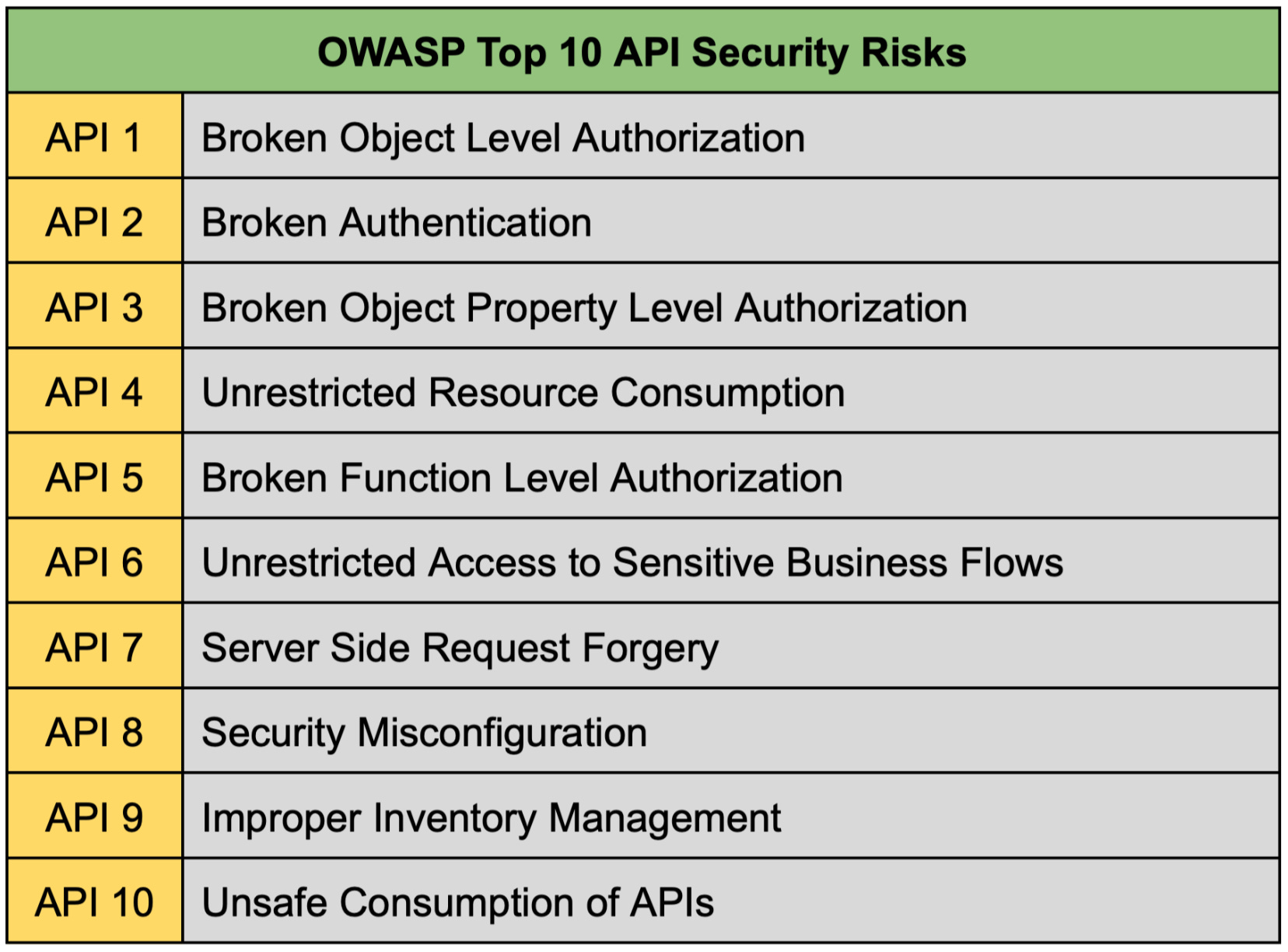
OWASP has identified and documented the top 10 most critical security risks for APIs, such as broken object-level authorization, security misconfiguration, and more.
To ensure a secure foundation, it's essential to review and address these risks during the design and development phases of our API. We can leverage OWASP's resources, such as the API Security Top 10 list shown in the table below, to assess our API's vulnerabilities and implement appropriate countermeasures.
API Gateway
An API gateway acts as a single entry point for clients to access our backend services and APIs. It provides a centralized layer for enforcing security policies, rate limiting, authentication, and other cross-cutting concerns. By using an API gateway, we can simplify the management of these security features across individual services or APIs.
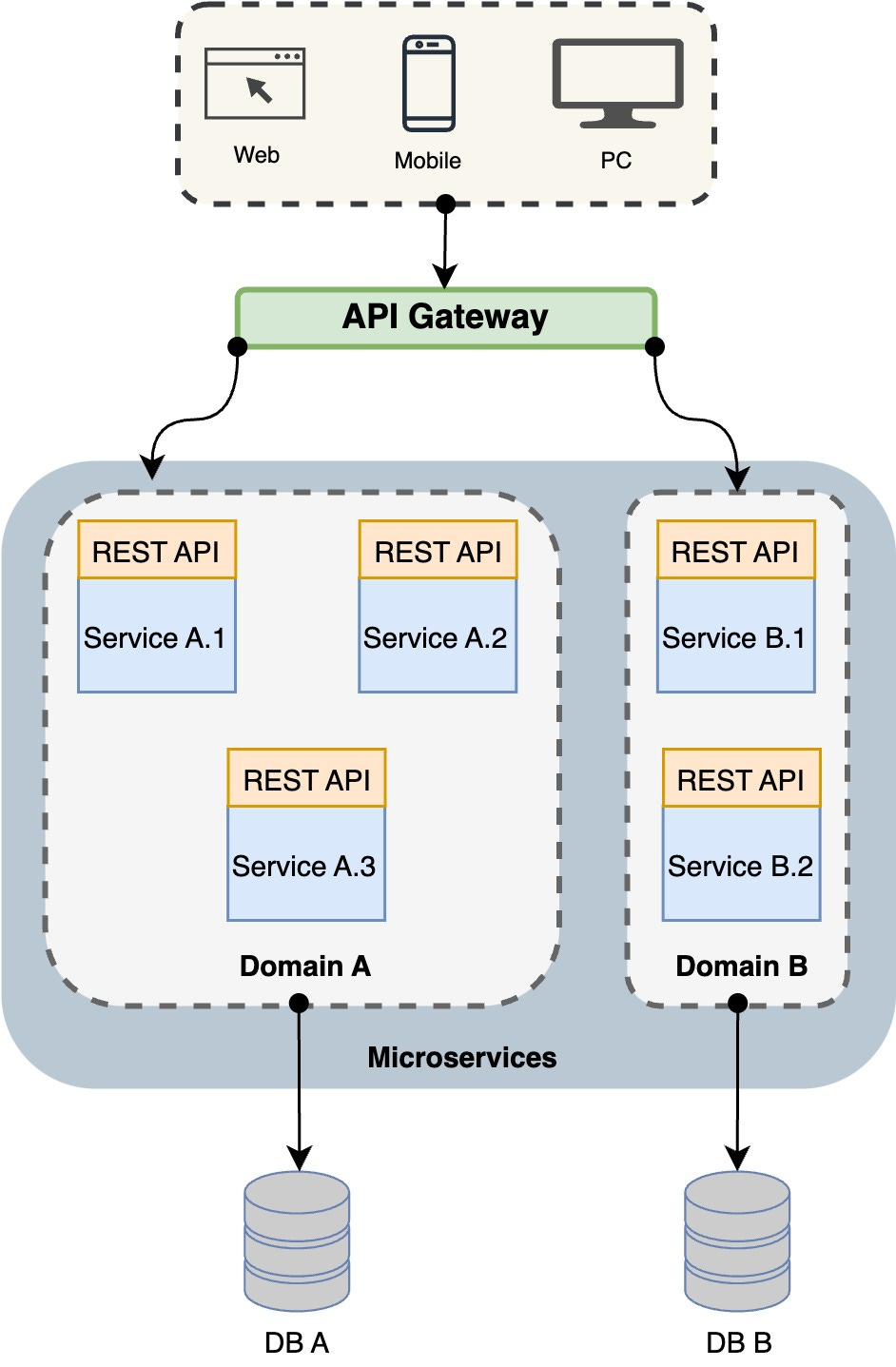
💡Note: API gateways offer additional benefits, such as traffic management, caching, logging, and monitoring, making them a valuable component in modern application architectures.
Error Handling
Proper error handling is crucial for API security and user experience. We want to provide clients with descriptive yet secure error messages when errors occur.
For example, instead of a vague "Internal Server Error," a good error message could be: "Failed to retrieve user data. Please check that you are authenticated and have sufficient permissions." This gives the client enough information to troubleshoot without exposing sensitive details.
Similarly, instead of exposing specifics about our backend (e.g., "SQL query failed due to malformed input containing a DROP TABLE command"), a better approach would be a generic "Invalid input provided. Please review and try again."
It's generally good to categorize errors as client errors, such as validation failures, or server errors, and return appropriate status codes, like 400 Bad Request or 500 Internal Server Error as shown below.
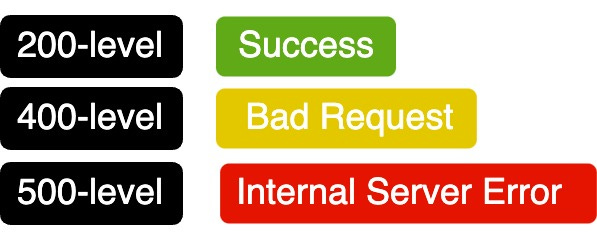
💡Note: Never return full stack traces or expose internal error messages and codes in production, as these can be treasure troves for attackers.
Input Validation
Implement robust input validation for all data received from clients. This includes validating request parameters, headers, payloads, and any other user-supplied input. Failing to validate input can lead to various vulnerabilities, such as SQL injection, cross-site scripting, and other injection attacks.
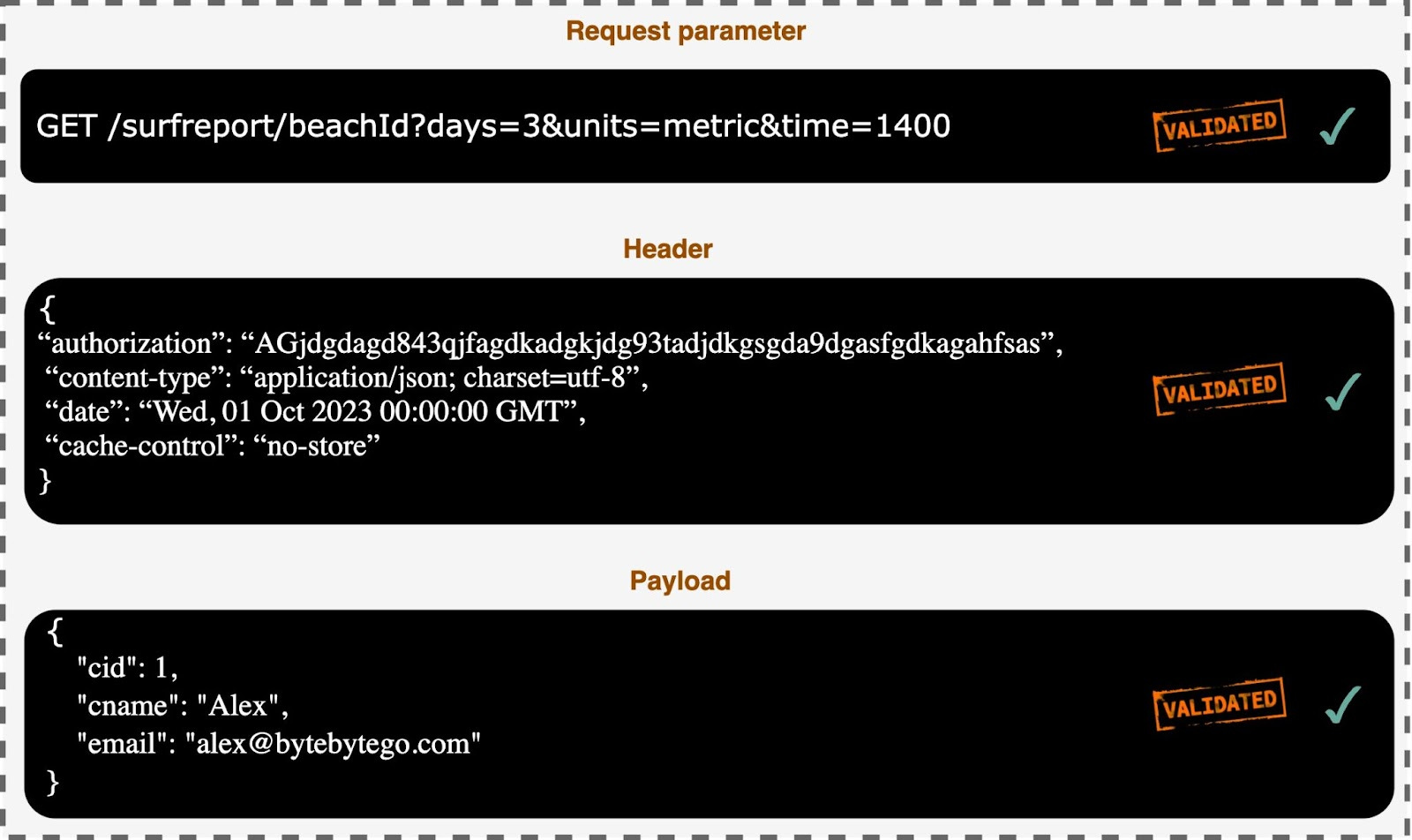
Input validation should be performed on both the client side and server side, as client-side validation alone is not sufficient. On the server side, use dedicated input validation libraries or frameworks to enforce strict validation rules and sanitize user input.
Wrap Up
Securing APIs is an ongoing process that requires vigilance and adaptation. By adopting the security best practices discussed in this issue, we can create a robust defense against various threats and protect our valuable data. Remember, API security is not just about keeping bad actors out; it's also about ensuring the smooth operation and reliability of APIs for legitimate users.
Stay informed about the evolving threat landscape, continuously monitor API security posture, and adapt strategies as needed. We can build trust with our users and developers by following best practices.


I want to know how API-GW provides an additional feature of traffic management, that is work of load balancer right?