
A Crash Course on Load Balancers for Scaling
A Crash Course on Load Balancers for Scaling

Over the years, load balancers have become a crucial component of system architecture, acting as the front-line gatekeepers that distribute incoming network traffic across multiple servers.
Much like a hotel receptionist who greets guests, checks their documents, and directs them to specific rooms, load balancers manage the data flow within a system to ensure that the system is horizontally scalable.
By effectively distributing the workload across multiple servers, load balancers help maintain system performance, even during peak usage.
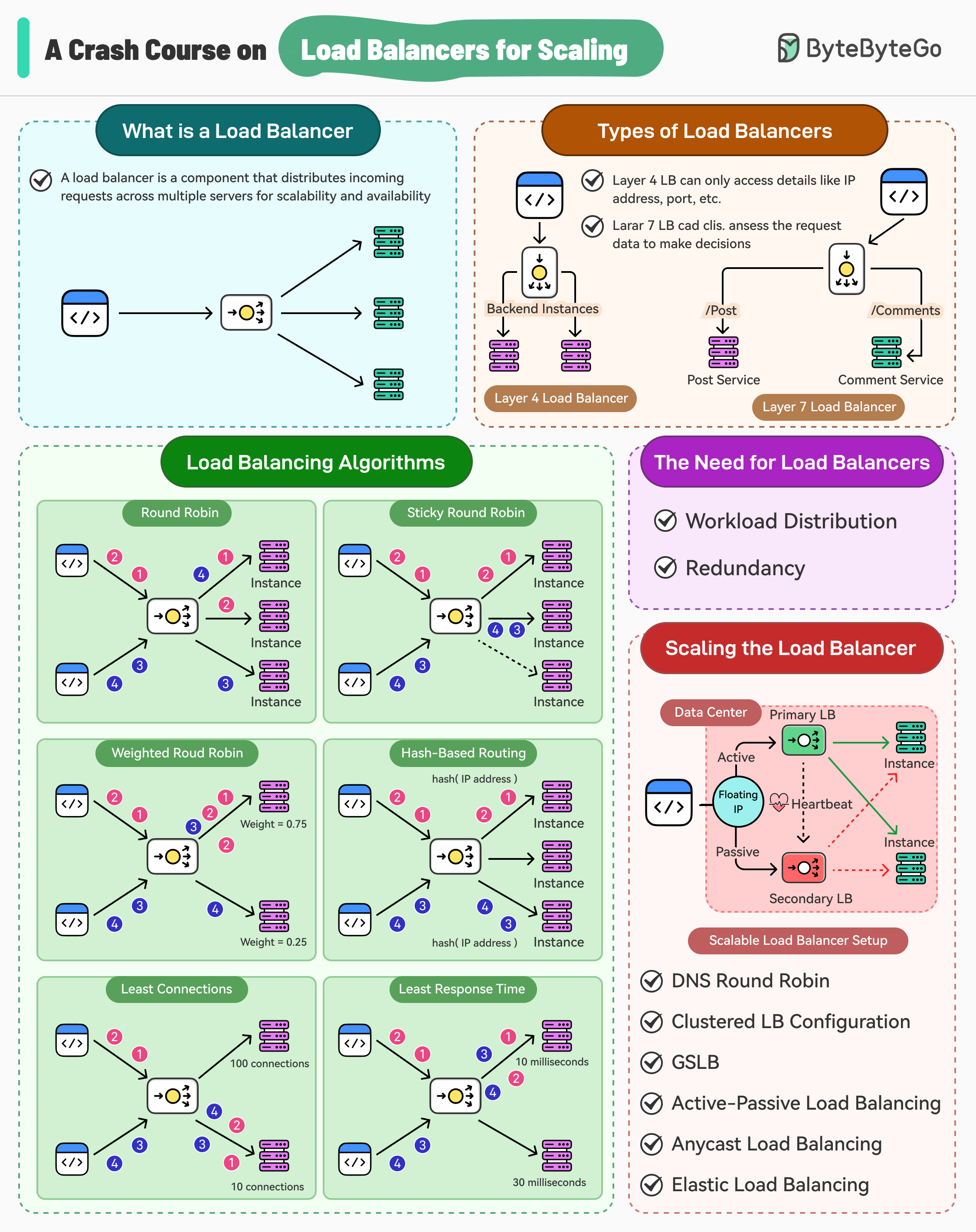
There are multiple benefits of load balancing:
Reduced Latency: Load balancers help minimize the response time for user requests. This reduction in latency translates to a better user experience.
Minimized Downtime: The load balancer can detect and route traffic away from unhealthy or offline servers.
Scalability: Load balancers are the key to horizontal scalability. As traffic demands increase, additional servers can be added, and the load balancer will automatically distribute the workload across the expanded infrastructure.
Of course, load balancers appear simple, which is a good thing.
Software developers can just plug it into their application stack and it is expected to perform its job. However, there are several aspects of load balancers that developers must be aware of to use them effectively for scaling their applications.
In this post, we’ll learn about load balancers in detail, why they are needed, the types of load balancers, and the various algorithms that power them. Also, we’ll look at some important techniques to ensure that load balancers are scalable and do not become single points of failure.
Why the Need for Load Balancing?
In the realm of high-traffic applications, the ability to handle a large number of concurrent requests is crucial for maintaining optimal performance and user satisfaction. Relying on a single machine becomes impractical and insufficient.
This is where two critical aspects of system scalability come into play: workload distribution and redundancy.
1 - Workload Distribution
When building a high-traffic application that needs to serve thousands of concurrent requests, relying on a single machine is not viable. To ensure the system can handle the increased workload, horizontal scaling becomes essential.
Horizontal scaling, also known as scaling out, is a technique that involves adding more machines to the system to increase its capacity. By distributing the workload across multiple machines, the application can handle a greater number of requests and maintain optimal performance.
Load balancers play a vital role in facilitating this workload distribution.
They act as the entry point for incoming requests and intelligently route them to the available machines based on various algorithms and policies, preventing any single machine from becoming overwhelmed.
2 - Redundancy
Availability is a critical metric that measures the system's ability to remain operational and accessible to users. High availability takes this concept to an even higher level, aiming for near-continuous uptime.
Typically, a server must have an uptime of 99.999% to be considered highly available.
Achieving such high levels of availability requires eliminating any single points of failure (SPOF) within the infrastructure or software layer. Load balancers contribute to this goal by providing redundancy and failover capabilities.
Consider a scenario where a backend service is responsible for handling requests.
To make this service highly available, multiple instances of the service are deployed. However, certain instances can become unhealthy, resulting in unavailability if requests are routed to them. Load balancers continuously monitor the health of the backend instances and route requests only to the healthy ones.
Types of Load Balancers
There are two main types of load balancers that developers can choose from:
1 - Layer 4 Load Balancers
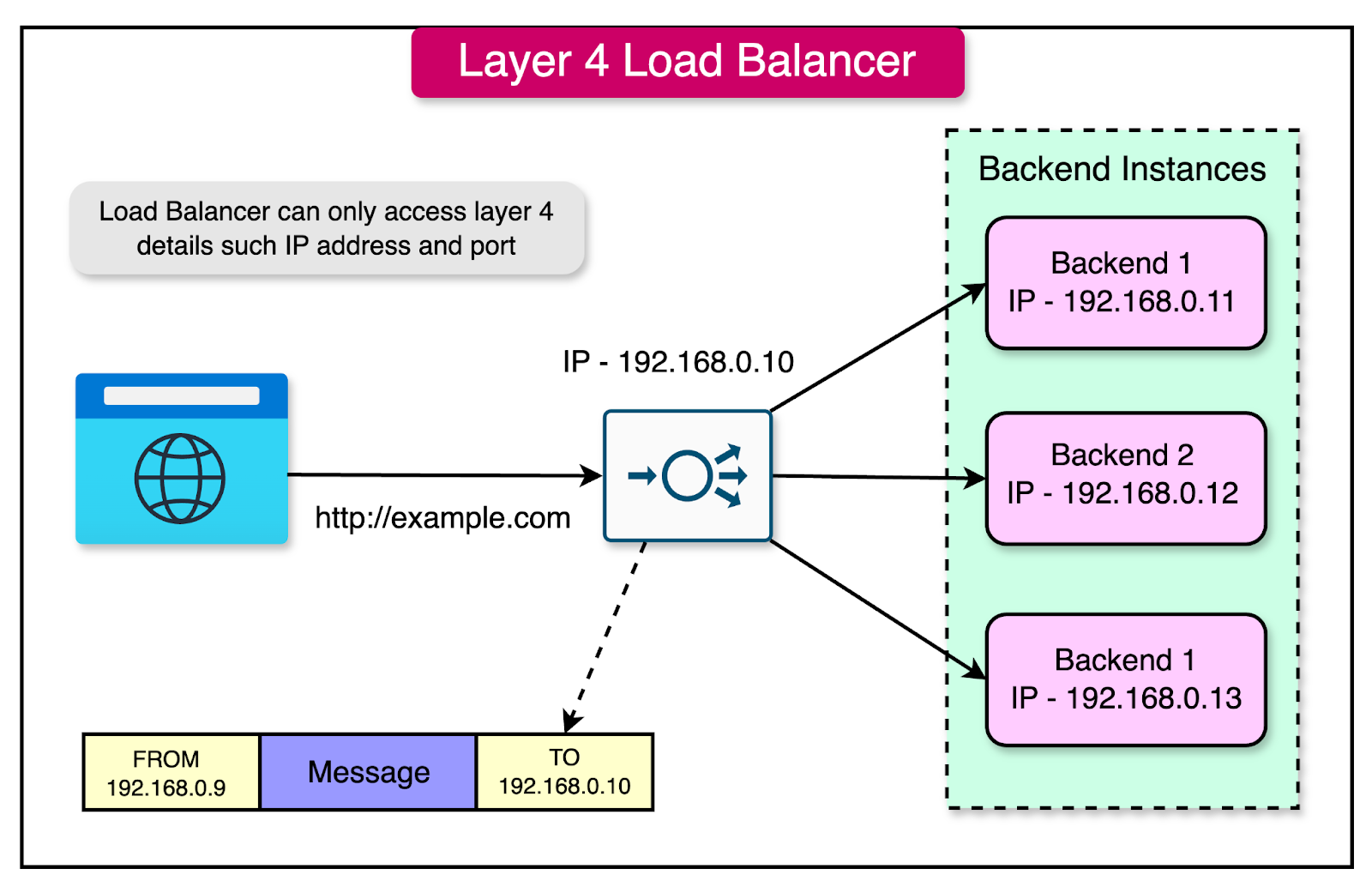
Layer 4 load balancers operate at the transport layer of the OSI (Open Systems Interconnection) model, making routing decisions solely based on the information available at this layer, such as IP addresses and port numbers.
One key characteristic of Layer 4 load balancers is that they do not inspect the content of the data packets. They focus on the network-level information and do not have visibility into the actual message or payload carried by the packets.
Here's a visual representation of how a Layer 4 load balancer operates:
Advantages of Layer 4 Load Balancers
Layer 4 load balancers offer several advantages:
Simplicity: Layer 4 load balancers are simpler to run and maintain as compared to higher-layer load balancers. Since they operate at the transport layer, they require less configuration and management overhead.
Better Performance: By avoiding the need to inspect the content of data packets, Layer 4 load balancers can achieve better performance. They do not perform data lookups or deep packet inspection, resulting in faster routing decisions and reduced latency.
Enhanced Security: Layer 4 load balancers do not need to decrypt TLS (Transport Layer Security) data, as they operate below the application layer. This enhances security by maintaining the confidentiality of encrypted traffic and reducing the attack surface.
Efficient Connection Handling: Layer 4 load balancers typically establish only one TCP connection between the client and the selected server. This reduces the overhead of managing multiple connections and improves overall efficiency.
Disadvantages of Layer 7 Load Balancers
While Layer 4 load balancers offer advantages, they also have some limitations:
Lack of Smart Load Balancing: Layer 4 load balancers cannot make intelligent routing decisions based on the content of the data packets. They rely solely on network-level information, which may not always result in optimal load distribution.
Limited Routing Capabilities: Layer 4 load balancers cannot route traffic to different service types or perform content-based routing. They are limited to routing based on IP addresses and port numbers, which may not provide the flexibility required for complex application architectures.
No Caching: Since Layer 4 load balancers cannot see the content of the data packets, they are unable to perform caching. Caching at the load balancer level can significantly improve performance by serving frequently requested content directly from the load balancer's cache.
Examples of Layer 4 Load Balancers
Several popular load-balancing solutions operate at Layer 4, including:
HAProxy: An open-source load balancer and reverse proxy that can operate at Layer 4 and Layer 7.
AWS Network Load Balancer: A highly scalable and high-performance load balancer provided by Amazon Web Services.
Azure Load Balancer: A Layer 4 load balancer offered by Microsoft Azure for distributing traffic across virtual machines.
2 - Layer 7 Load Balancers
In contrast to Layer 4 load balancers, Layer 7 load balancers operate at the application layer of the OSI (Open Systems Interconnection) model. They deal with Layer 7 protocols such as HTTP(S), WebSocket, FTP, and SMTP.
The key difference between Layer 4 and Layer 7 load balancers lies in their ability to inspect the content of the data packets. While Layer 4 load balancers make routing decisions based solely on network-level information, Layer 7 load balancers can examine the actual data within the packets and make routing decisions based on that information.
The below diagram shows the concept of a Layer 7 load balancer.
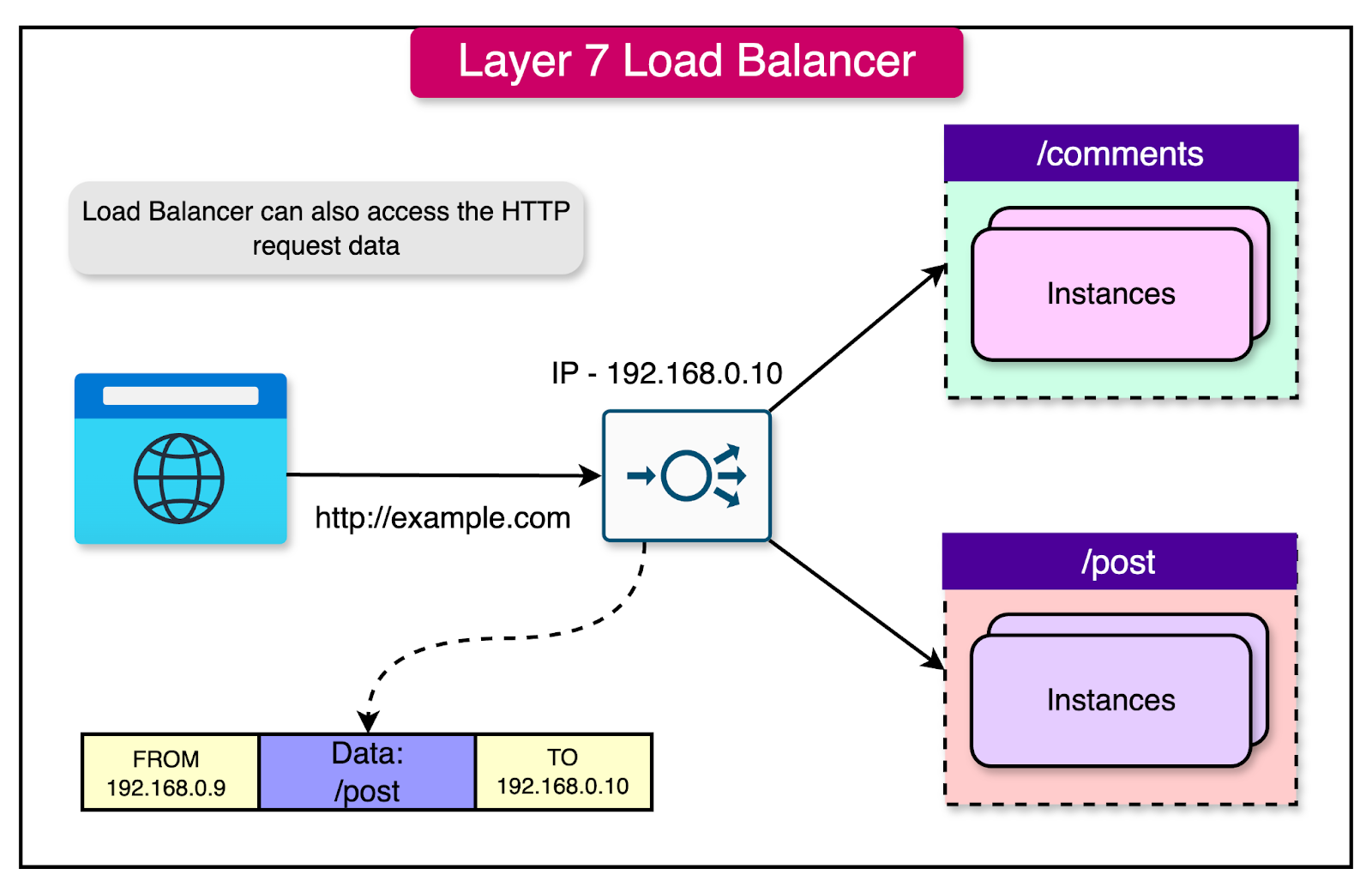
Let's consider a scenario where you have two microservices: one dedicated to handling blog posts (/post) and another to managing comments (/comments). Here's how a Layer 7 load balancer would handle a client request:
The client establishes a TCP connection with the load balancer and sends a request to access the /post route.
The load balancer decrypts the data and inspects the configured routing rules.
Based on the request destination (/post), the load balancer establishes a new TCP connection to the server instances hosting the Post service.
Once the response is received from the Post service instances, the load balancer sends the response to the client.
Advantages of Layer 7 Load Balancers
Layer 7 load balancers offer several advantages over Layer 4 load balancers:
Smarter Load Balancing: Layer 7 load balancers can make intelligent routing decisions based on the content of the data packets. They can inspect headers, URLs, cookies, and other application-level information to route requests to the most appropriate server instances. This enables more advanced load-balancing strategies and optimized resource utilization.
Caching Capabilities: Layer 7 load balancers can cache frequently requested content, reducing the load on backend servers and improving response times. By serving cached content directly from the load balancer, network latency is minimized, and the application performance is enhanced.
Reverse Proxy Functionality: Layer 7 load balancers can act as reverse proxies, providing additional features such as SSL termination, URL rewriting, and request/response modification. This allows for better security, performance optimization, and simplified application architecture.
Disadvantages of Layer 7 Load Balancers
While Layer 7 load balancers offer advanced capabilities, they also have some potential drawbacks:
Higher Cost: Layer 7 load balancers are more complex and resource-intensive compared to Layer 4 load balancers. They require more processing power and memory to inspect and manipulate application-level data, resulting in potentially higher operational and maintenance costs.
Data Decryption: To inspect the content of encrypted traffic (HTTPS), Layer 7 load balancers need to decrypt the data packets. This additional processing overhead can impact performance and introduce security considerations, as the load balancer needs access to the encryption keys.
Multiple TCP Connections: Layer 7 load balancers typically maintain two TCP connections: one between the client and the load balancer, and another between the load balancer and the backend server. This can result in increased resource utilization and potential performance overhead compared to Layer 4 load balancers.
However, it’s also important to note that some disadvantages have become negligible over the years, and Layer 7 load balancers have become much more prevalent. Most of the time, it is far better to opt for a Layer 7 load balancer unless there is a strong requirement for a Layer 4 load balancer.
Examples of Layer 7 Load Balancers
Several popular load-balancing solutions operate at Layer 7, including:
HAProxy: An open-source load balancer and reverse proxy that supports both Layer 4 and Layer 7 load balancing.
Nginx: A widely used web server and reverse proxy that can also function as a Layer 7 load balancer.
AWS Application Load Balancer: A Layer 7 load balancer provided by Amazon Web Services, offering advanced routing capabilities and integration with other AWS services.
Azure Application Gateway: A Layer 7 load balancer offered by Microsoft Azure, providing features such as SSL termination, URL-based routing, and web application firewall.
Load Balancing Algorithms
The effectiveness of load balancing heavily depends on the algorithm used to determine which request should be routed to which particular server.
Load balancing algorithms can be broadly categorized into two types: static and dynamic.
Static Load Balancing Algorithms
Static load balancing algorithms distribute traffic among servers based on pre-determined rules or fixed configurations.
These algorithms do not adapt to changing server workloads and rely on predefined criteria for request distribution.
1 - Round Robin
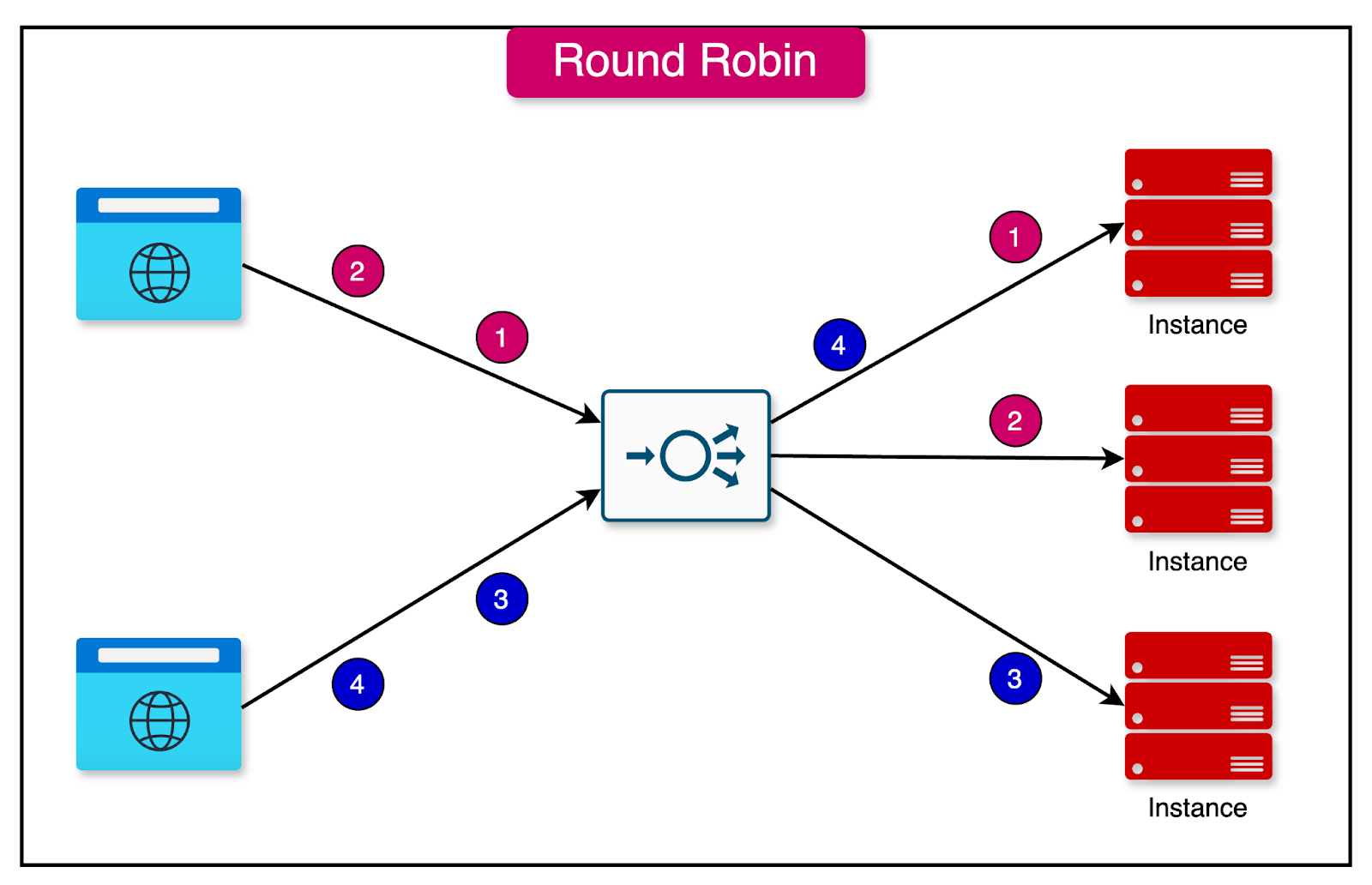
In the round-robin algorithm, requests are distributed sequentially across a group of servers.
Each server takes its turn in handling incoming requests cyclically. The main assumption is that the service is stateless, as there is no guarantee that subsequent requests from the same user will reach the same server instance.
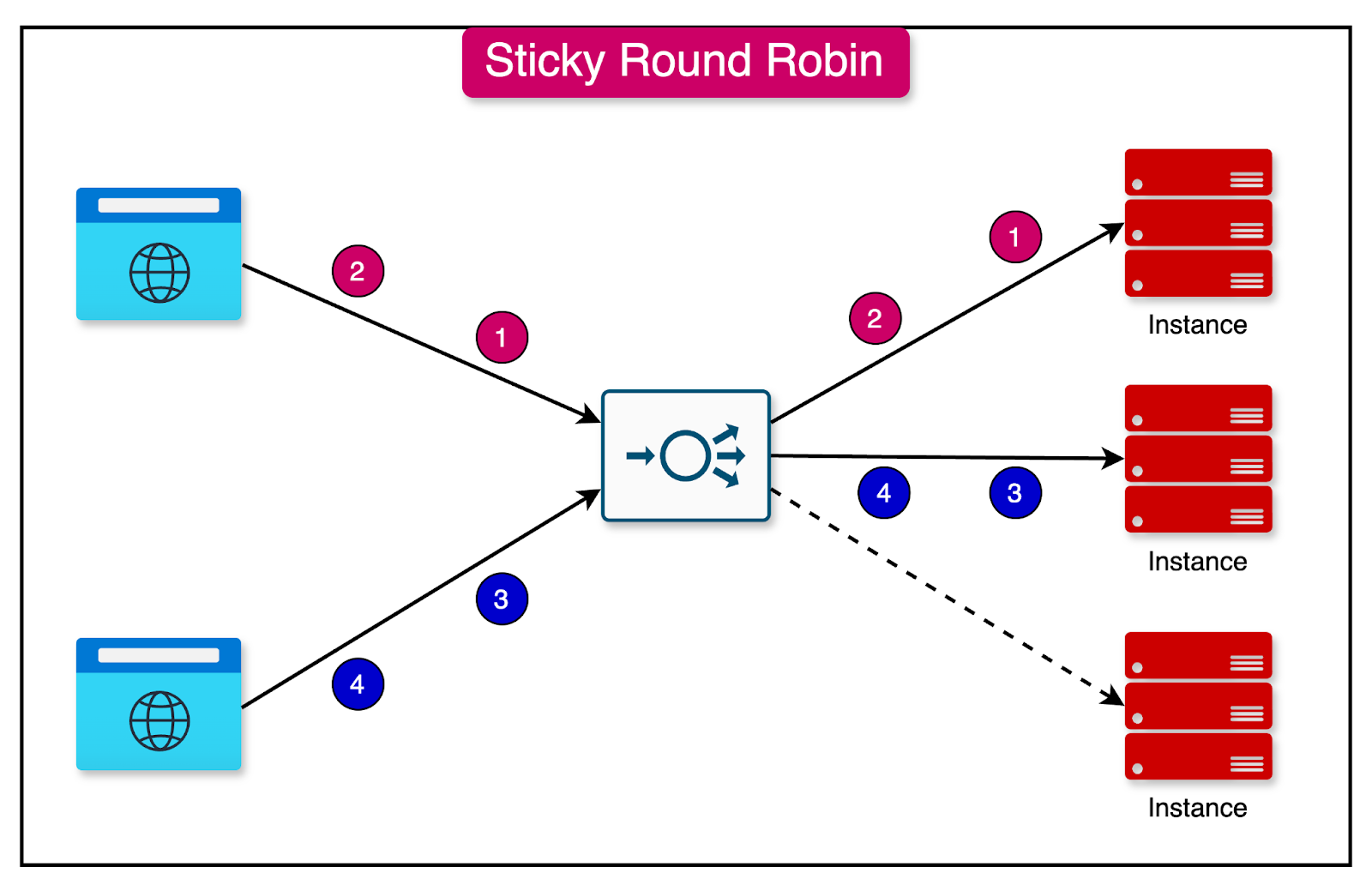
2 - Sticky Round Robin
Sticky round robin is an enhancement to the basic round robin algorithm.
It ensures that subsequent requests from the same user are routed to the same server instance. This can be desirable in certain use cases where maintaining session affinity is important.
3 - Weighted Round Robin
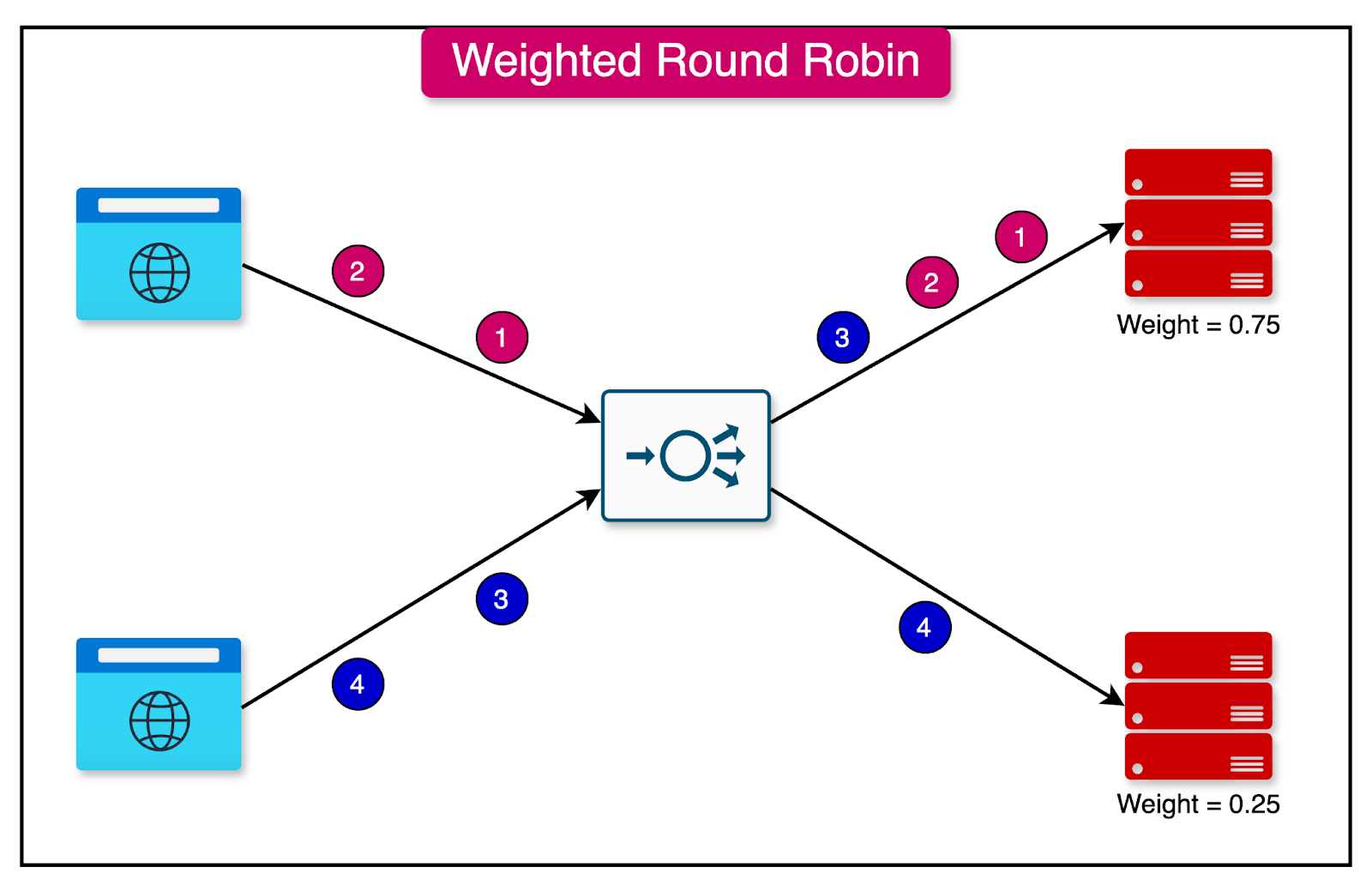
The weighted round-robin algorithm assigns a specific weight value to each server instance.
The weight determines the proportion of traffic that will be directed to a particular server. Servers with higher weights receive a larger share of the traffic, while servers with lower weights receive a smaller share.
For example, if server instance A is assigned a weight of 0.75 and instance B is assigned 0.25, server A will receive three times as much traffic as instance B. This approach is useful when different servers have varying capacity levels and the traffic should be assigned based on that.
4 - Hash-Based
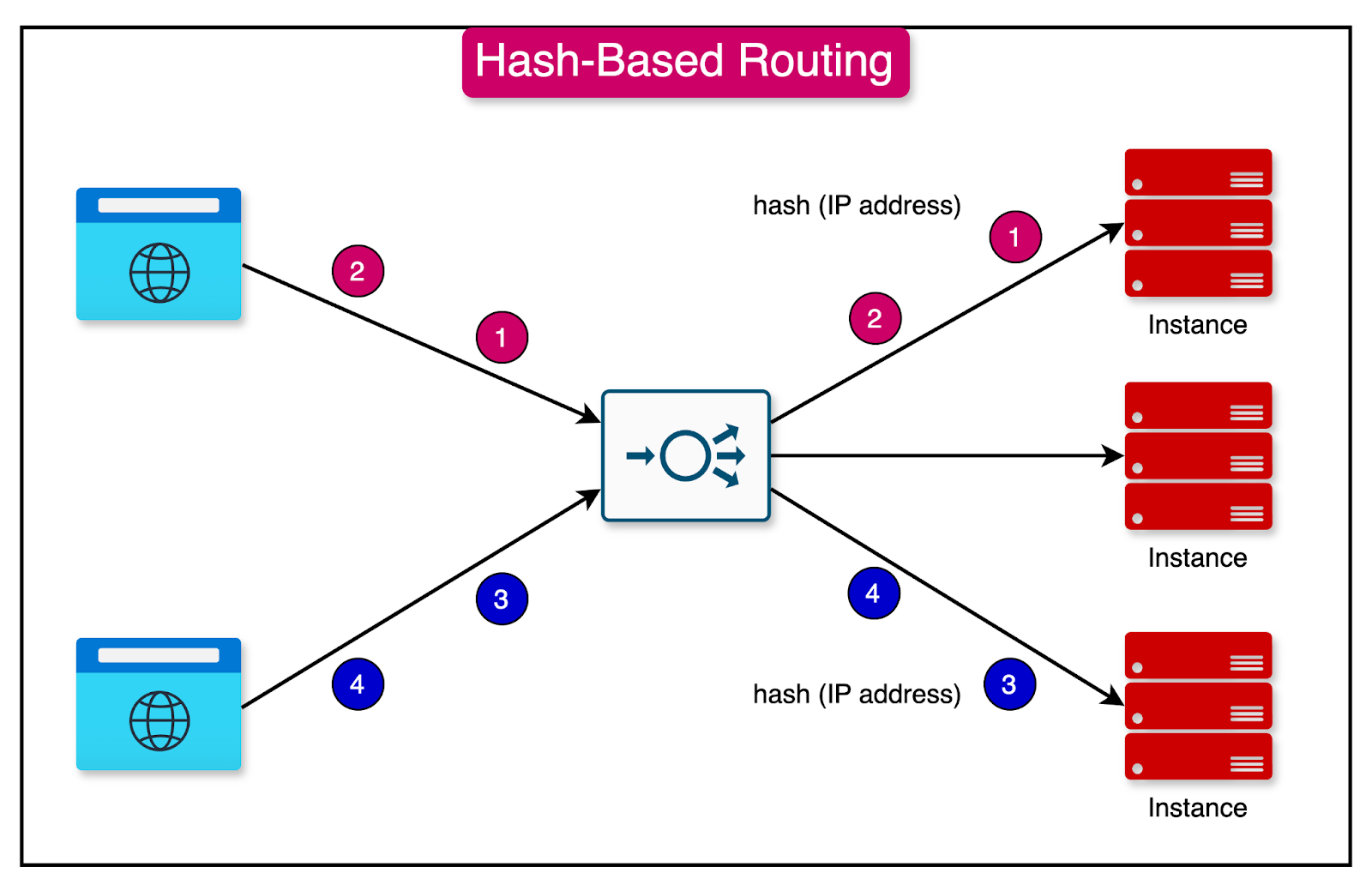
The hash-based algorithm distributes requests based on the hash value of a particular key, such as the combination of source and destination IP addresses.
The hash function determines which server instance will handle the request. This algorithm ensures that requests with the same hash value are consistently routed to the same server instance.
Dynamic Load Balancing Algorithms
Dynamic load balancing algorithms consider real-time factors that change dynamically to make routing decisions.
These algorithms adapt to the current state of the servers and distribute traffic accordingly.
1 - Least Connections
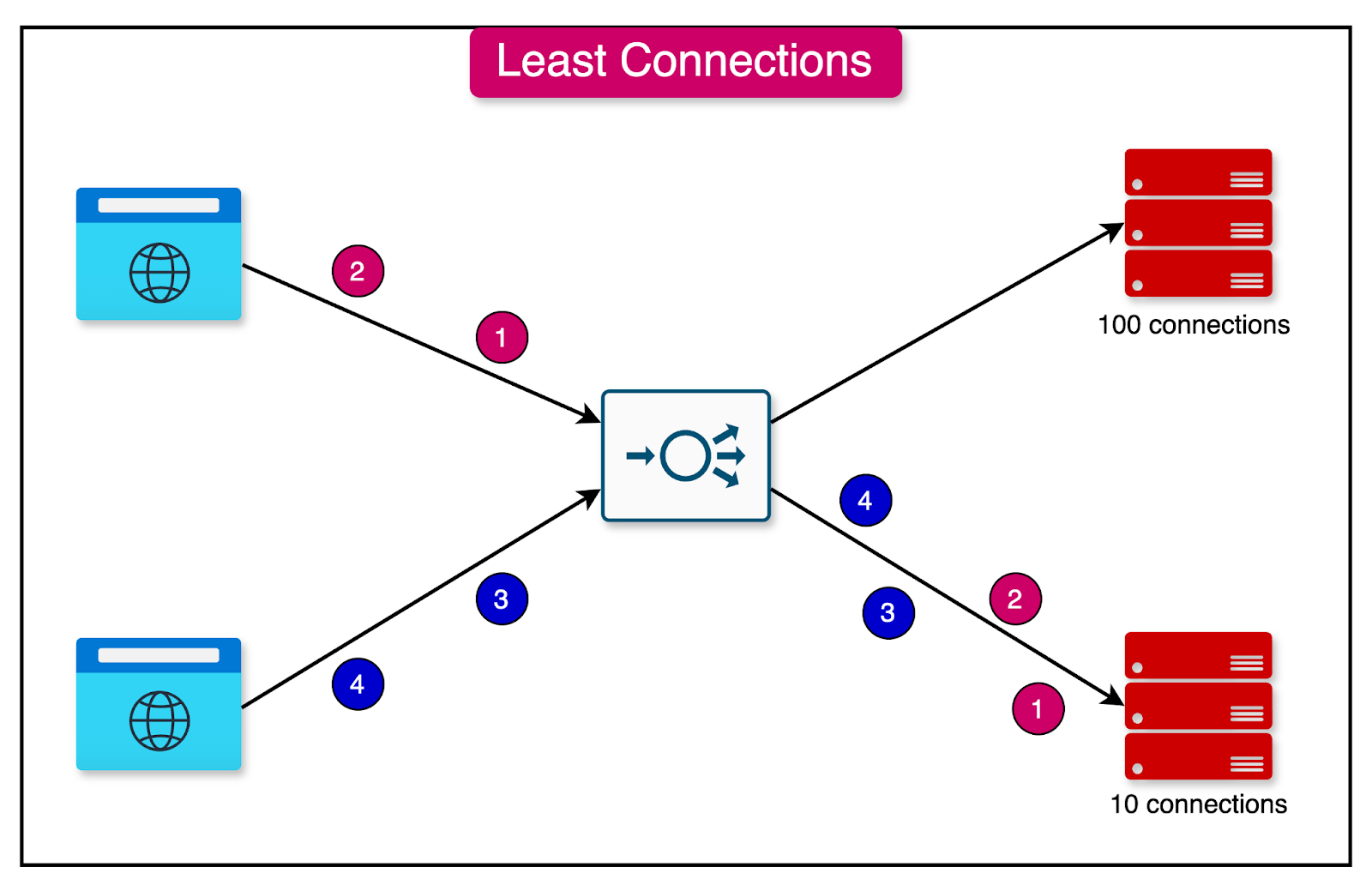
The least connections algorithm assigns a new request to the server instance with the least number of active connections.
The number of connections is determined based on the relative computing capacity of each server. Server instances with more resources can support a higher number of connections compared to instances with lower resources.
This algorithm evenly distributes the load across servers based on their current connection count.
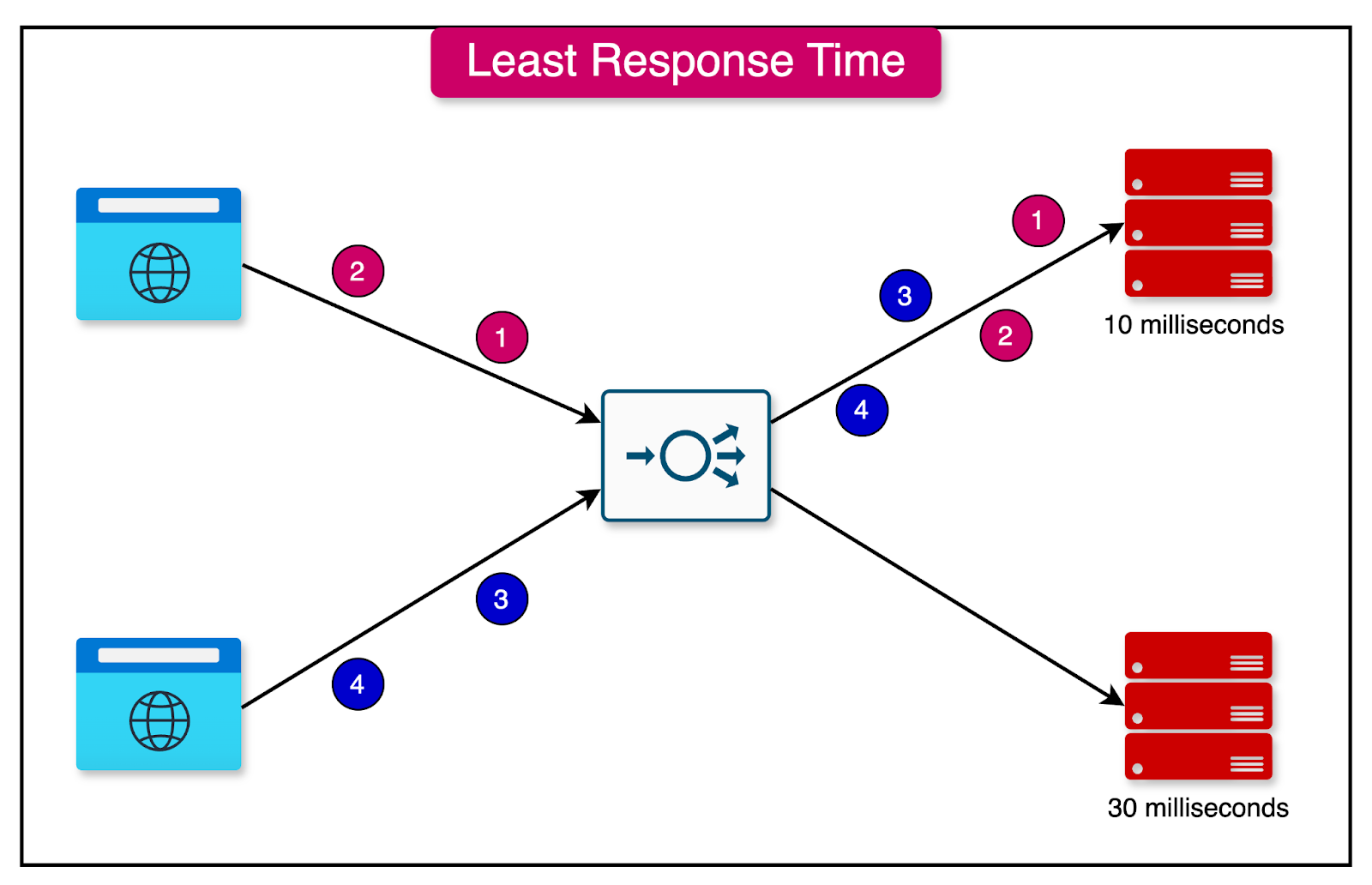
2 - Lowest Response Time
In the lowest response time algorithm, the load balancer assigns incoming requests to the server with the lowest response time.
The goal is to minimize the overall response time of the system by routing requests to the server that can provide the quickest response.
This algorithm is particularly useful in scenarios where response time is a critical factor, and requests must be handled by the most responsive server instance.
Scaling Load Balancers
While load balancers help scale the application, it’s important to ensure that they don’t become bottlenecks to the scalability.
Let’s look at some key techniques to scale the load balancers:
DNS Round Robin
DNS round robin is a simple technique for scaling load balancers.
Multiple load balancers are configured with different IP addresses but share the same domain name. When a client sends a DNS query for the domain name, the DNS server responds with one of the IP addresses from the configured pool.
The DNS server rotates through the IP addresses, distributing the traffic across the load balancers. Each subsequent DNS query receives the next IP address in the rotation, ensuring a balanced distribution of requests.
Clustered Configuration with HAProxy or Nginx
Software load-balancing solutions, such as HAProxy or NGINX Plus, offer an alternative to hardware-based clustering for distributing traffic across multiple servers.
In a software load-balancing setup, multiple instances of the load-balancing software, such as HAProxy or NGINX Plus, are installed on separate servers or virtual machines. These instances work together in a clustered configuration to distribute incoming traffic across the backend servers.
Global Server Load Balancing
Global Server Load Balancing (GSLB) is a technique that extends the concept of load balancing beyond a single data center or geographical location.
In a GSLB setup, multiple data centers or server clusters are deployed in different geographical locations. Each data center hosts a replica of the application and its associated resources.
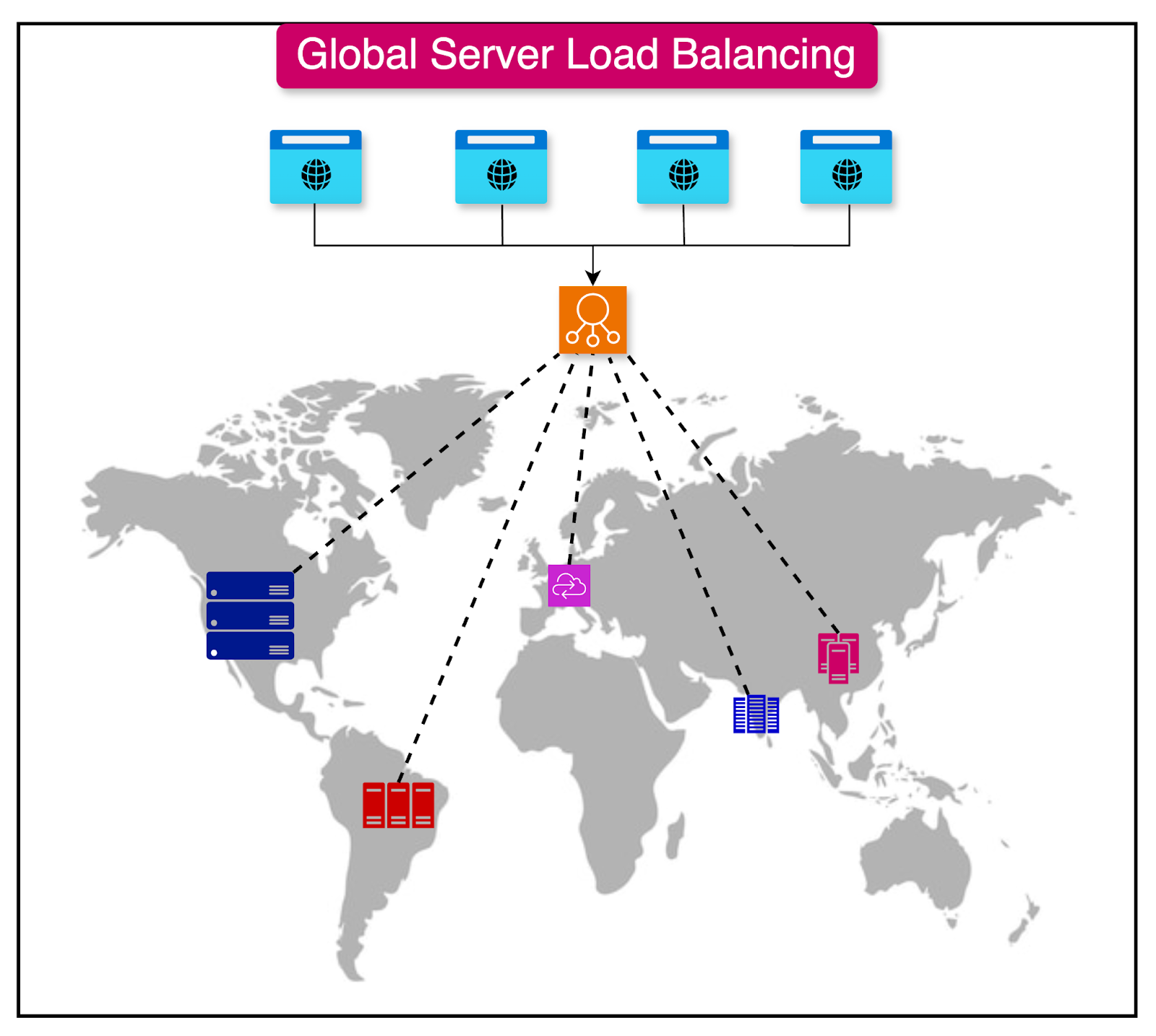
The GSLB system uses DNS (Domain Name System) to route client requests to the appropriate data center. When a client sends a DNS query for the application's domain name, the GSLB system responds with the IP address of the data center that is best suited to handle the request.
Active-Passive Load Balancing
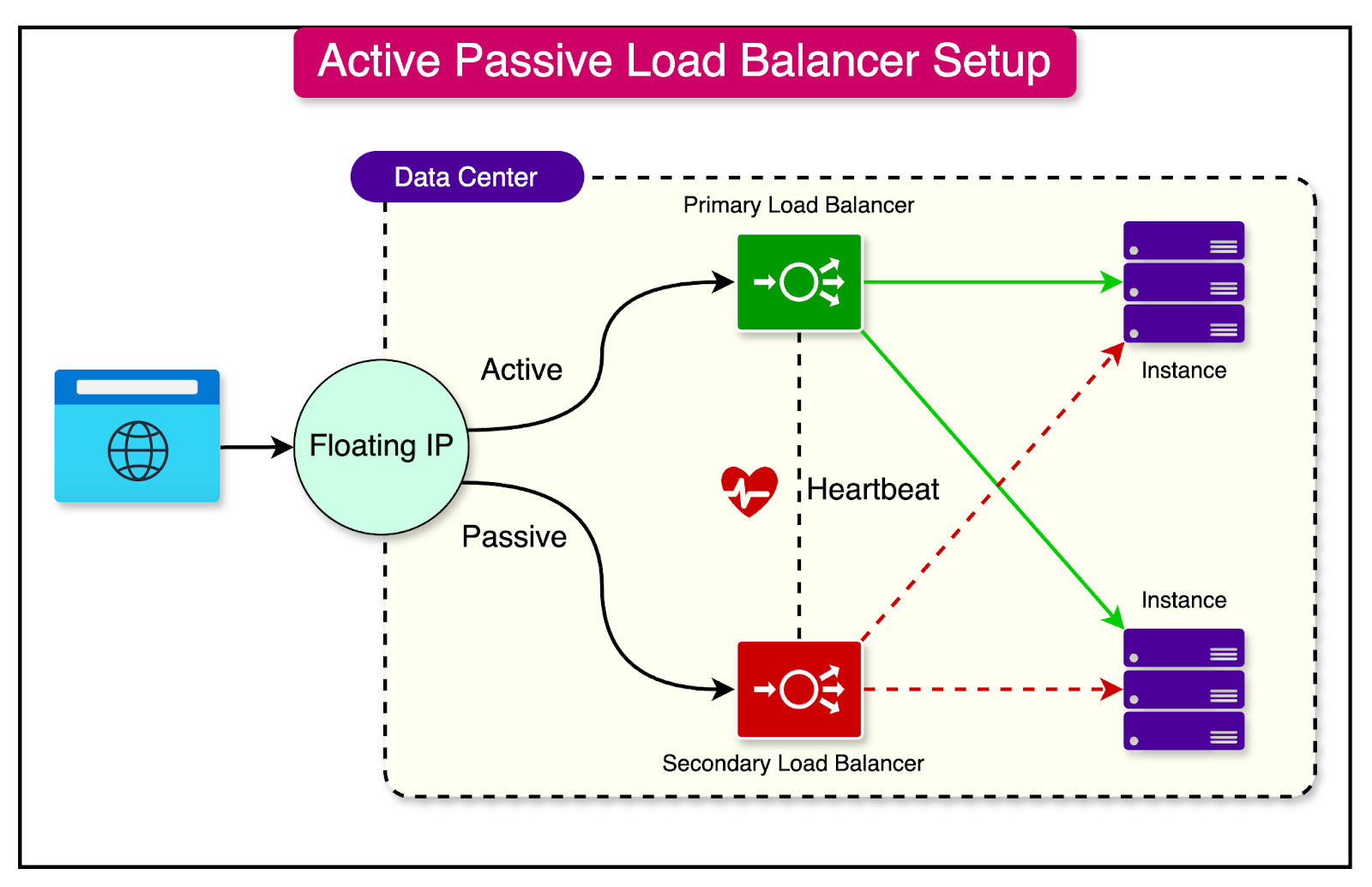
Active-passive load balancing is a deployment strategy that ensures high availability by providing a simple failover mechanism.
In an active-passive load balancing configuration, two load balancers are deployed redundantly. The primary load balancer, known as the active load balancer, is responsible for actively distributing the incoming traffic to the backend servers.
The secondary load balancer, referred to as the passive or standby load balancer, remains idle and does not actively participate in traffic distribution. It continuously monitors the health and status of the active load balancer.
In the event of a failure or outage of the active load balancer, the passive load balancer detects the failure and automatically takes over the traffic handling responsibilities.
Elastic Load Balancing with Cloud
Auto-scaling load balancers are a powerful feature offered by cloud providers that automatically adjust the number of load balancer instances based on the incoming traffic.
In an auto-scaling load balancer setup, the cloud provider continuously monitors the traffic patterns and resource utilization of the load balancers.
As the traffic volume increases, the auto-scaling mechanism automatically provisions additional load balancer instances to handle the increased load.
Conversely, when the traffic subsides, the auto-scaling mechanism removes excess load balancer instances to optimize resource utilization and cost.
Common scaling metrics include CPU utilization, request rate, response time, and network bandwidth.
Anycast Load Balancing
Anycast load balancing is a technique that involves multiple load balancers sharing the same IP address across different geographical locations.
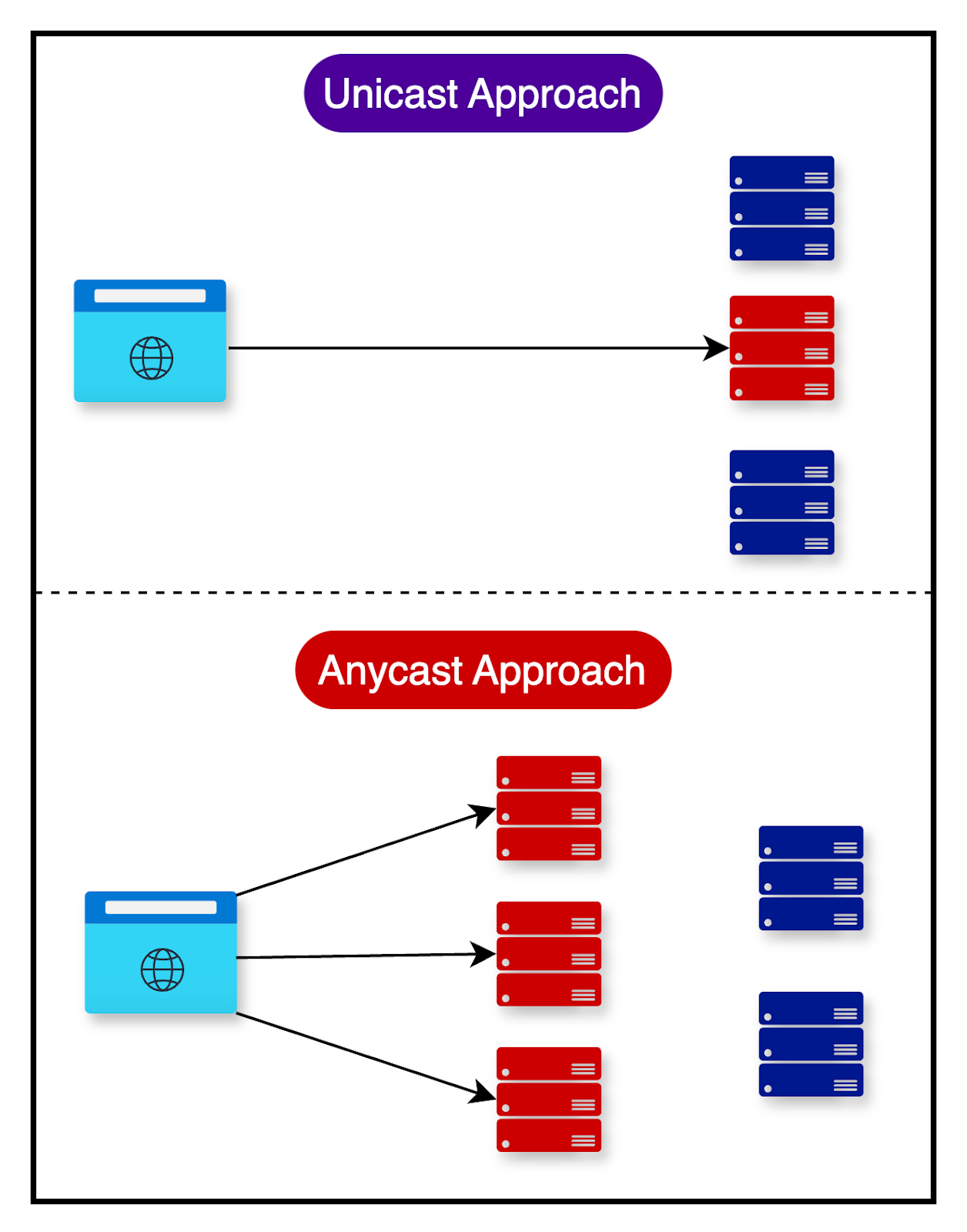
In an anycast load balancing setup, multiple load balancers are deployed in various locations, such as data centers or regions. Each load balancer is assigned the same IP address, known as an anycast address.
When a client sends a request to the anycast address, the request is routed to the nearest available load balancer based on the network topology and routing protocols. The routing decision is made by the network infrastructure, typically using Border Gateway Protocol (BGP) to determine the shortest path to the nearest load balancer.
Summary
In this article, we’ve learned a great deal about load balancers, how they help scale an application, and how to ensure the load balancers are scalable and highly available.
Let’s summarize the learnings in brief:
By effectively distributing the workload across multiple servers, load balancers help maintain system performance, even during peak usage.
Two main reasons behind using a load balancer are workload distribution and redundancy.
There are two main types of load balancers - layer 4 and layer 7.
Layer 4 load balancers make routing decisions solely based on the information available at Layer 4, such as IP addresses and port numbers.
Layer 7 load balancers can examine the actual data within the packets and make routing decisions based on that information.
The effectiveness of load balancing heavily depends on the algorithm used to determine which request should be routed to which particular server. There are two main categories of load-balancing algorithms - static and dynamic.
Static load balancing algorithms distribute traffic among servers based on pre-determined rules or fixed configurations. Round Robin, Sticky Round Robin, Weighted Round Robin, and Hash-based are some examples.
Dynamic load balancing algorithms consider real-time factors that change dynamically to make routing decisions. Least Connections and Lowest Response Time are some examples.
While load balancers help with horizontal scalability, it is also important to keep the load balancers scalable and available. A few techniques to scale the load balancers are DNS Round Robin, Cluster Configuration, GSLB, Active-Passive Load Balancing, Elastic Load Balancing with Cloud, Anycast Load Balancing, etc.


Thank you for the article. I noticed a couple of typos, especially in the images,Disadvantages of Layer 7 Load Balancers (this should be layer 4 etc) . Please try to avoid these in the future.
Learned and created mind map for the same: https://whimsical.com/load-balancer-2KkY1wxfnYEyjoJoWvtBsv